
Marketing Automation for Small Business: 6 Workflows to Set Up First
By Keys of Success Published Updated Reviewed by Ali Darwish 9 min read
Which six marketing workflows a small team should automate first, what to leave to people, how automation differs from a CRM, and how to prove it pays back with cost per lead and return on ad spend.

Marketing automation for small business means software handles the repeat steps between an enquiry and a sale. Set up six workflows in order: lead capture, instant WhatsApp reply, follow-up reminders, nurture messages, ad-to-sale tracking and reporting. Keep pricing and trust conversations human, and judge results by cost per lead and return on ad spend.
Marketing automation for small business means letting software do the repeat steps between a stranger seeing your ad and a customer paying you: saving the enquiry, replying, reminding your team, sending the next message, tracking the source and reporting the numbers. A team of three to ten people does not need a large platform to benefit. It needs six workflows set up in the right order, a clear line around what stays human, and two numbers to check, cost per lead and return on ad spend.
What marketing automation for small business really covers
A marketing automation workflow is a rule of the form "when this happens, do that". A form is submitted, so a WhatsApp message goes out. A lead has not been called in 24 hours, so the manager gets a reminder. The rule runs every time, at any hour, without anyone remembering to run it.
Many small businesses lose sales in the gaps between enquiry and sale, such as unanswered enquiries and missed callbacks, and not only because of their ads. An enquiry sits in an inbox overnight, a lead is never called back, a campaign cannot be connected to a sale. Automation closes those gaps. It does not replace a good offer or a good salesperson.
The wrong way to start is to buy marketing automation tools and then look for something to automate. The better way is to list where leads currently leak, then fix those points one at a time. The six workflows below follow the path a lead takes, so each one makes the next one more useful.
Marketing automation vs CRM: what each one does
The two are often sold as one thing, and many products combine them, but the jobs differ. A CRM is the record: who the lead is, where they came from, which stage the deal is in and who owns it. Automation is the action layer: it sends, assigns, reminds and triggers based on what the record says.
| Question | CRM | Marketing automation |
|---|---|---|
| Main job | Store leads, clients, deals and the pipeline | Trigger messages and tasks from events |
| Typical output | A lead list, stages, source and sales reports | Replies, reminders, scheduled campaigns |
| Who uses it daily | Salespeople and managers | Mostly runs in the background |
| What goes wrong without it | Leads live in chats and spreadsheets | Follow-up depends on memory |
For a small team the practical answer to marketing automation vs CRM is: start with the record. Automation that has no shared lead list behind it sends messages nobody can trace to a sale. A CRM lead list shows each lead's date, stage, salesperson and team in one place, which is the base every workflow below builds on.
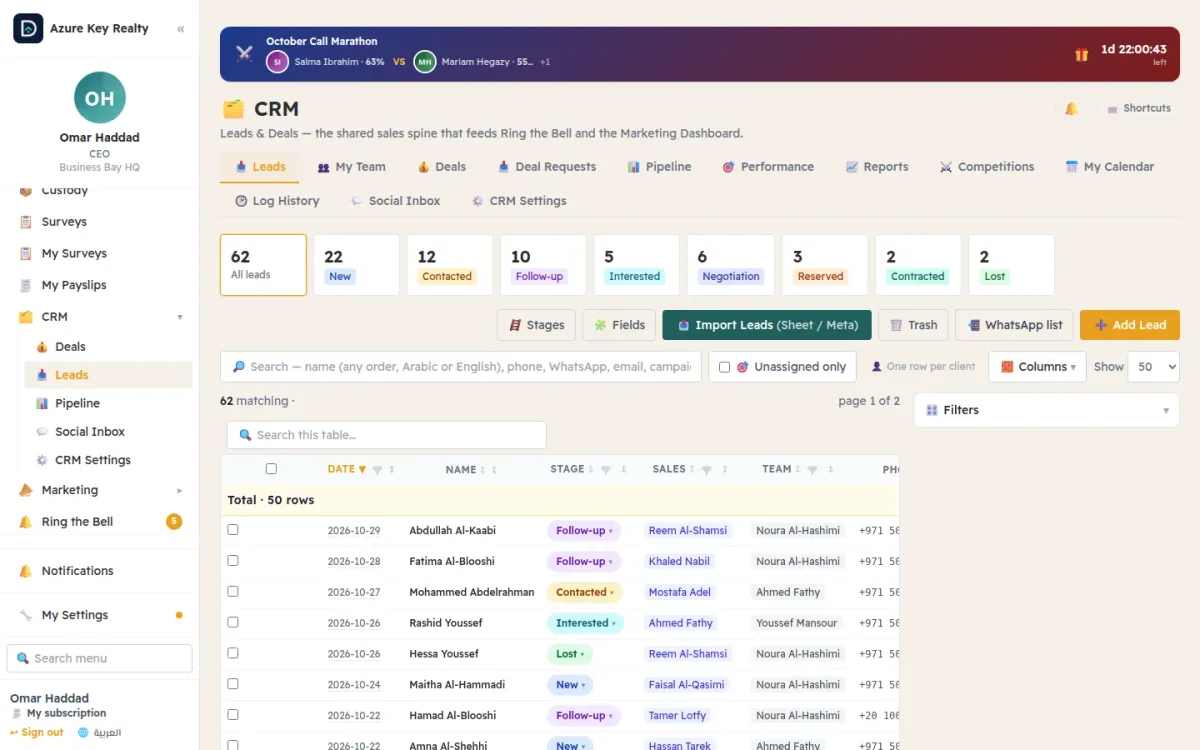
If you are still choosing, our article on business automation for SMEs shows which tasks to automate across the whole company, and marketing is one of them.
The 6 marketing workflows to automate first
1. Lead capture
Every enquiry, from a website form, an ad form, a call or a WhatsApp message, should land in one list with its source attached. This is the foundation. If leads are split across phones, inboxes and notebooks, nothing after this step works properly. Decide a short list of sources (for example Meta ads, website, referral, walk-in) and make the source a required field.
2. Instant WhatsApp reply
The first response is the one most worth automating. A short automatic message thanks the person, confirms what they asked about, asks one useful question and says when a human will call. This is where WhatsApp marketing automation earns its place, because many customers start their enquiry with a WhatsApp message, and a quick reply there keeps their interest. Keep it to three or four lines and write it in the language your customer used.
Check the WhatsApp rules before you switch this on. If the person messaged you on WhatsApp, you can reply with free-form messages within 24 hours of their last message. If the lead came from a form or an ad, your first WhatsApp message is business-initiated: it must be an approved template, and the person must have opted in to receive WhatsApp messages from you. The same applies to any message sent outside that 24-hour window, whether to one person or to many. Write templates plainly and have them approved before you need them, not on the day a campaign is due.
3. Follow-up reminders
To automate lead follow-up, give every new lead a task with a deadline and an owner. If the task is not done by the deadline, the reminder goes to the salesperson, then to the manager. The rule matters more than the tool. Pick a response time you can honestly meet, such as the same working day, and measure against it.
4. Nurture messages
Not every lead is ready to buy this week. A nurture sequence sends a few useful messages over two to four weeks: an answer to a common question, a customer result, a reminder of the offer. Email and WhatsApp automation work well together: email for longer explanations and documents, WhatsApp for short nudges. Three to five messages are enough. Stop the sequence the moment the lead replies or buys, otherwise automation starts to feel like pestering.
5. Ad-to-sale tracking
This workflow connects the campaign to the money. Each lead keeps its source and campaign, and when a deal is won the value is recorded against it. Without this, you only know what you spent and how many leads you got. With it, you know which campaign produced paying customers. Marking the deal result is a human habit that automation then builds on, so make it part of closing every deal.
6. Reporting
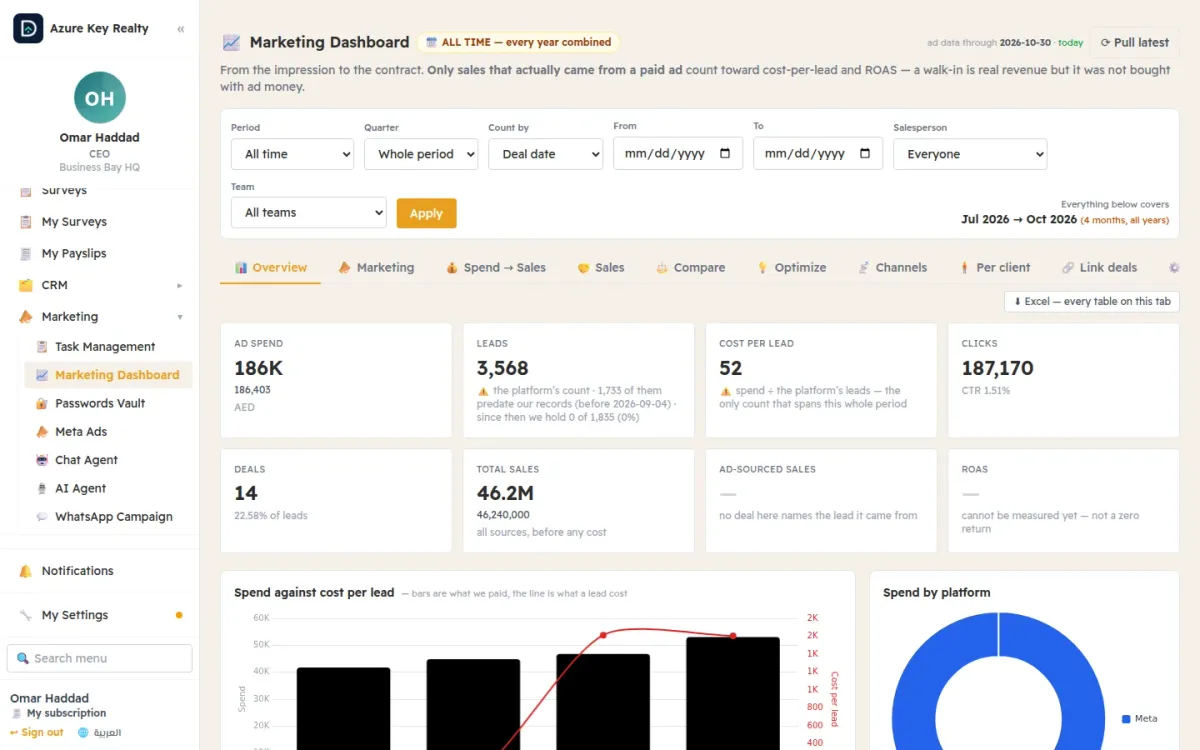
Last, send yourself a weekly one-page report: spend, leads, cost per lead, deals won, revenue and return on ad spend, split by source. Setting it up last is deliberate. Reports are only as good as the capture and tracking beneath them. Built on the first five workflows, they take little extra effort to produce.
What to keep human
Automation is good at speed and consistency. It is poor at judgment and warmth. Keep a person in these places:
- Price and negotiation. A customer asking for a discount wants an answer from someone who can decide.
- Complaints and delicate messages. An automatic reply to an upset customer makes things worse.
- High-value leads. Set a rule that routes these to a senior person immediately, rather than into a sequence.
- The first real conversation. The automatic message opens the door; a person should walk through it quickly.
- Anything you would be embarrassed to explain. If a customer would be upset to learn a machine wrote it, rewrite it or send it by hand.
A simple test: automate the steps where the customer wants speed, and keep human the steps where the customer wants to be understood.
How to check that automation is paying back
Two numbers are enough for a small team. Cost per lead is ad spend divided by the number of leads that spend produced. Return on ad spend is the revenue from sales that came from those ads divided by the spend. Cost per lead tells you how efficiently you attract interest. Return on ad spend tells you whether that interest turned into money.
Here is an illustration with made-up round numbers. You spend 10,000 on ads in a month and receive 50 leads, so cost per lead is 200. Five of those leads buy, bringing 60,000 in revenue, so return on ad spend is 6. Now suppose the reminder and instant reply workflows cut the number of forgotten leads. The next month the same spend gives the same 50 leads, but eight buy. The cost per lead is unchanged, and the return climbs. That is the pattern to look for: automation of follow-up usually shows up in return on ad spend, not in cost per lead.
Compare the month before you automate with the two months after. Change one workflow at a time so you can tell which one made the difference. If cost per lead is low but return on ad spend is weak, look at the follow-up and the offer, and also at the quality of the leads the ads bring in.
A worked example: leads, WhatsApp campaigns and the dashboard in one system
At Keys of Success we built Dealora, a real estate ERP that we also operate, and it is a useful example of these workflows sitting in one place. The principles apply to any small business, not only property. Three parts matter here.
The CRM holds leads, clients, deals and the pipeline, with sources and reports. That is workflows one, three and five: capture, ownership and the source of every lead. The WhatsApp campaign feature (Growth plan and above) sends bulk campaigns with approved templates and lists the sent, replied and failed counts for each campaign, so you see how a message performed.
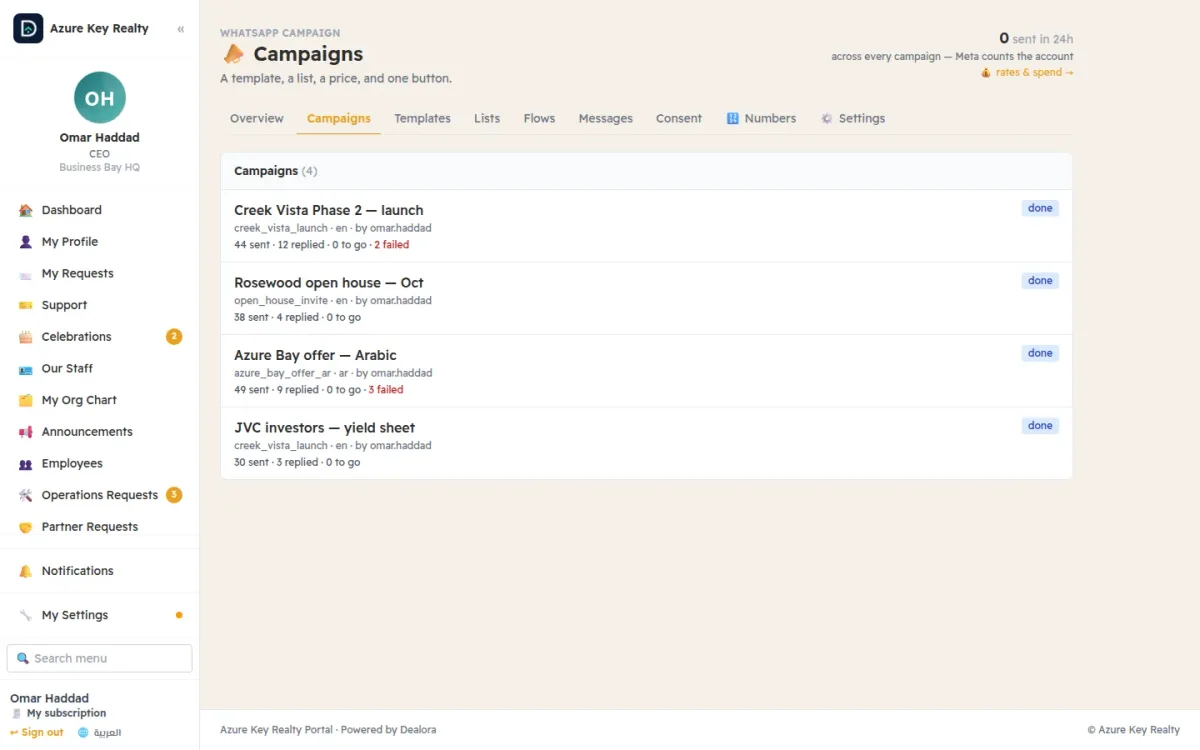
The marketing dashboard, also on the Growth plan and above, then shows spend, leads and sales together, with cost per lead and return on ad spend. Because the campaign, the lead and the deal live in one system, nobody has to rebuild the numbers in a spreadsheet at the end of the month. For the property-specific version of this, see tracking leads from Meta ads to closed deals.
How to choose marketing automation tools
You do not need the longest feature list. Check these points before you commit:
- One lead list. Can leads from ads, your website and WhatsApp land in the same place with their source?
- Your languages. Do messages, templates and screens work in Arabic and English if your customers use both?
- Approved WhatsApp templates. Can you manage and send them for campaigns?
- Sales results in the same system. Can a won deal be tied back to the campaign that produced it?
- Simple rules. Can your own team change a reminder or a message without a developer?
- A clear exit. Can you export your leads and history if you leave?
If your needs do not fit an off-the-shelf product, for instance because your sales process is unusual, our AI full integration service builds assistants and automation into daily work, and our e-marketing service plans campaigns that are measured from spend to sales.
A four-week set-up order
Do not switch everything on at once. A small team can follow this suggested pace, though the time it takes varies by team and tools:
- Week 1: lead capture and the source list. Move every lead into one place.
- Week 2: the instant reply and the follow-up reminders. Agree the response time.
- Week 3: a short nurture sequence for leads who did not buy, plus deal results recorded against each source.
- Week 4: the weekly report. Read cost per lead and return on ad spend, and note what to change.
After a month, write down your baseline numbers and pick the one workflow with the weakest result. Improve that one before adding anything new. If you would like a second pair of eyes on your set-up, you can contact the Keys of Success team with a short description of how a lead moves through your business today.
Sources
Frequently asked
What is marketing automation for a small business?
It is software that performs repeat marketing and follow-up steps without someone doing them by hand: saving an enquiry, sending a first reply, reminding a salesperson to call, sending scheduled messages and reporting results. It saves a small team time and stops leads from being forgotten, while people still handle real conversations.
What is the difference between marketing automation and a CRM?
A CRM is the record of your leads, clients, deals and pipeline stages. Marketing automation is the action layer that sends messages, assigns tasks and sends reminders based on events. A small business should start with the CRM, because automation without a shared lead list sends messages nobody can trace to a sale.
Which marketing workflow should a small business automate first?
Start with lead capture. Every enquiry from a form, call, ad or WhatsApp message should land in one list with its source attached. Every later workflow, including instant replies, reminders and reporting, depends on that list. After capture, automate the instant reply, because the first response is where many leads are lost.
What should a small business not automate in marketing?
Keep people in price negotiation, complaints, high-value leads and the first real conversation with a prospect. Automation is good at speed and consistency but poor at judgment and warmth. A useful test: automate steps where the customer wants speed, and keep human the steps where the customer wants to be understood.
How do I know if marketing automation is paying back?
Track cost per lead (ad spend divided by leads) and return on ad spend (revenue from ad-sourced sales divided by spend). Compare the month before automating with the two months after, changing one workflow at a time. Follow-up automation usually shows up in return on ad spend rather than in cost per lead.
Related

Read next
- Real Estate Drip Campaign: Build a Follow-Up Sequence A step-by-step build of a real estate drip campaign for new property leads: the trigger, five messages over 14
- All in One vs Separate Real Estate Software: How to Decide Five apps for CRM, WhatsApp, ad reports, HR and files cost a brokerage hours of re-typing and lost lead histor
- Lead to Deal Conversion Rate: How to Calculate It by Stage A step-by-step method to calculate your lead to deal conversion rate: fix the counting rules, follow one cohor
- AI to Human Handoff in Sales: 8 Triggers for a Brokerage Eight concrete triggers for passing a chat from an AI agent to a salesperson, plus how to assign it with conte