
All in One vs Separate Real Estate Software: How to Decide
By Keys of Success Written Published Reviewed by Ali Darwish 9 min read
Five apps for CRM, WhatsApp, ad reports, HR and files cost a brokerage hours of re-typing and lost lead history. Here is when one portal wins, when separate tools still make sense, and how to test it.

One portal suits a brokerage when leads, WhatsApp chats, ad numbers, HR and project files must share one record and one set of reports. Separate tools still win where a specialist system already works or the team is tiny. Test both by tracing one lead from first message to closed deal and counting every re-entry.
The choice between all in one vs separate real estate software comes down to one question: how often does the same piece of information have to be typed, copied or chased across apps? If a lead, its WhatsApp chat, the ad that brought it and the files sent to it live in four places, one portal can save hours of re-entry. If one specialist tool already does its job and rarely needs to talk to the others, keeping it separate is a sound call. The test below shows where to draw the line.
What running a brokerage on five apps looks like
Some offices did not choose their apps on purpose: each one arrived to solve a problem on its own day, and together they became the system. A typical set looks like this:
- A CRM or a spreadsheet for leads, clients and deals.
- WhatsApp on phones and in groups, where most client conversations and developer updates actually happen.
- Ad dashboards and exports for Meta or Google campaigns, read by the marketing person.
- An HR tool or paper for attendance, leave and hiring.
- A shared drive for brochures, price lists, unit files and developer documents.
Each tool works. The trouble sits between them, in the handoff, and that is where a brokerage leaks time. The real estate tech stack audit is a useful way to list what you run today before you decide anything.
Where five separate apps lose time and data
Duplicate entry
A lead arrives from an ad form. Someone copies it into the CRM, someone else adds it to a campaign sheet, and the salesperson saves the number on a phone to message it. Three entries for one person, with three chances for a typo in the phone number. Multiply that by every lead in a launch week and the re-typing is a part-time job nobody was hired for.
Lead history that stays in the wrong app
The real history of a lead is usually the conversation: what the client asked, which project they liked, what the salesperson promised. When that lives on one person's phone, the CRM shows a name and a stage but not the story. If the salesperson leaves or the lead is reassigned, the new owner starts from zero and the client repeats everything.
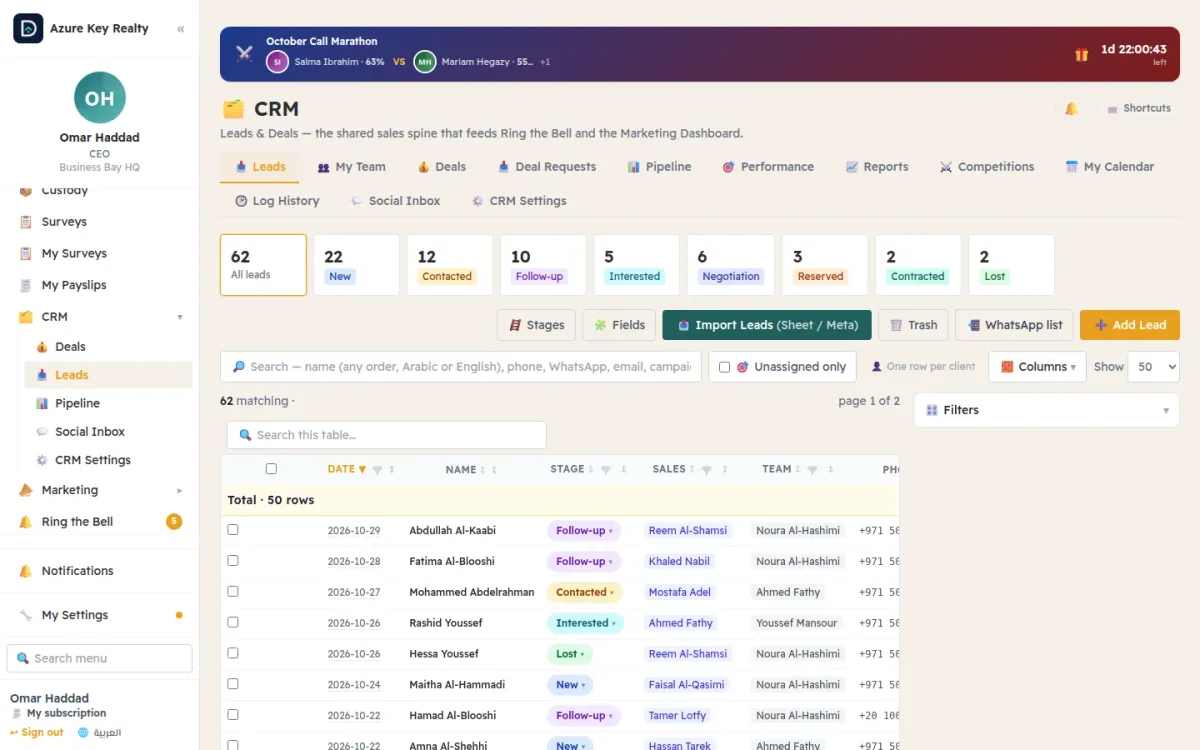
A CRM that holds the stage, the owner and the date of every lead gives that history one home. The conversation still has to reach it, which is the next gap.
Messages outside the record
WhatsApp has a rule that shapes how a team can reply: a free-form (non-template) reply is allowed only within 24 hours of the client's last message. After that, only an approved template reaches the client. In a separate-apps setup, nobody sees that clock, so a reply either goes late or goes from a personal number that the company cannot see.
Reports built by hand
When ad spend sits in one app, leads in another and closed deals in a third, a weekly report means three exports and a manual match. The numbers are only as good as the person matching them, and the report is already a week old when it is read. This is also why cost per lead is easy to find and cost per closed deal is not.
Counting the handoff cost in hours
The subscription is the visible cost of software. The hidden one is time, and you can count it without any accounting. Use this formula for each handoff in your process:
minutes per re-entry × number of extra places × leads per month ÷ 60 = hours per month
Here is an example, with made-up numbers you should replace with your own. Say each lead is re-entered in 2 extra places, 3 minutes each, and the office receives 400 leads a month. That is 3 × 2 × 400 = 2,400 minutes, or 40 hours a month, before counting a single search for a lost conversation or a corrected phone number.
Then add three counts that do not need a formula:
- How many times a week does someone ask "where is the file for that project?"
- How many leads a month lose their history when ownership changes?
- How many hours does the weekly report take, and how many people touch it?
If these numbers are small, you do not have a consolidation problem. If they are large, you do.
All in one vs separate real estate software, side by side
| Area | Five separate apps | One portal |
|---|---|---|
| Lead entry | Entered or imported once per app | Entered once, used by every team |
| Client conversations | On phones and in groups, linked to the lead by memory | Messages sit next to the lead, where a Social Inbox is on the plan |
| Ad reporting | Exports matched by hand to leads and deals | Spend, leads and sales read from one place |
| HR | A separate tool or paper, with its own staff list | Staff list shared with permissions and sales teams |
| Files | A drive with its own folder logic | Files kept under the developer and project they belong to |
| Best tool for one job | You pick the strongest for each job | Each module is good enough for daily use, not always the deepest |
| Setup effort | Small per tool, large to connect them | One setup, one set of users and permissions |
| Switching later | Replace one app at a time | Moves a whole way of working, so plan it |
The last two rows are the honest trade. Separate tools let you choose the best of each, and they leave the connecting to you. One portal removes the connecting and asks you to accept one vendor's version of each module.
What one portal fixes, and how Dealora does it
Dealora is the real estate ERP that Keys of Success built and runs, sold to real estate companies in Egypt, Saudi Arabia and the UAE, in Arabic and English. It puts the CRM, developers and projects, marketing, HR and company administration in one portal, so the five apps above become sections of one system. Here is how it maps to each gap.
- Leads and history: the CRM module holds leads, clients, deals, the pipeline, sources and reports. It is on every plan.
- Staff and permissions: Employees, with departments, job titles and permissions, is on every plan, so the people who sell are the same people the CRM assigns leads to.
- Developers, projects and files: Developers & Projects and the Projects Map keep developers, phases and files together, and the map sends project files to a client. Both are on every plan.
- WhatsApp and social messages: the Social Inbox brings Facebook, Instagram and WhatsApp messages into the CRM. It starts on the Growth plan and needs the company's own Meta connection: its Facebook page, Instagram and WhatsApp Business number.
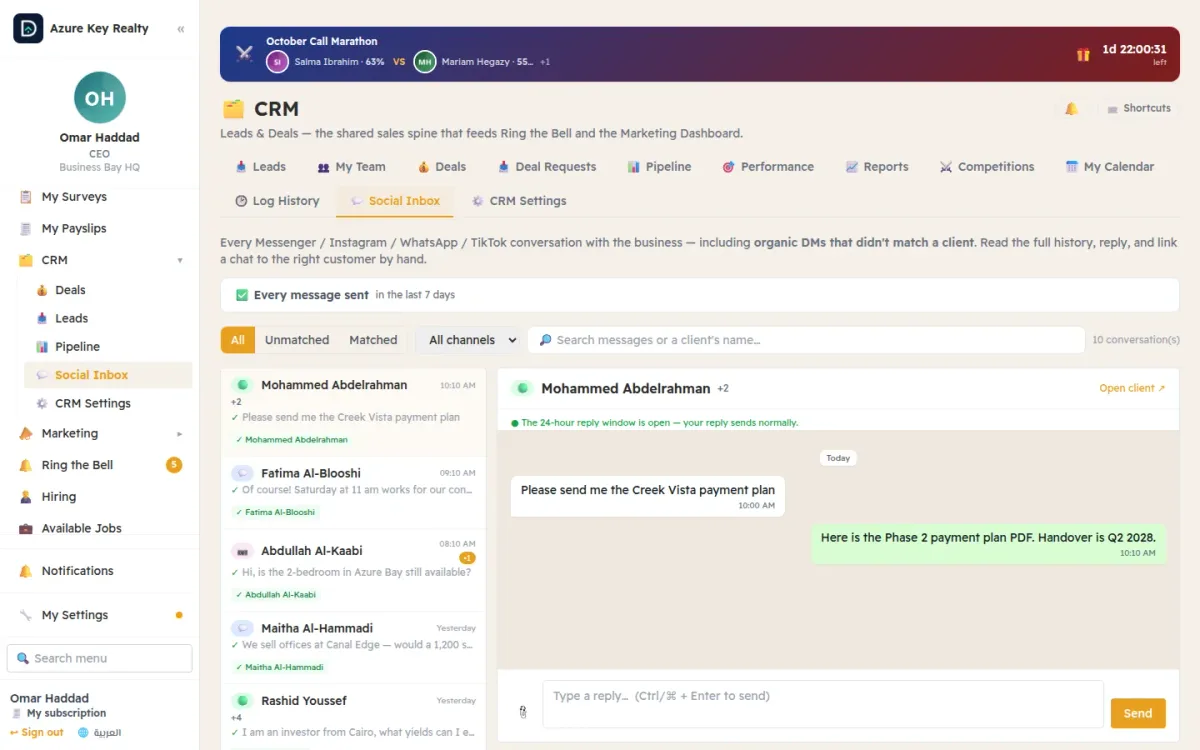
In the Social Inbox, a salesperson sends free-form replies only while the 24-hour window is open. After that the Send button becomes Log sent: the salesperson writes to the client from their own phone and Dealora records it. Approved WhatsApp templates go out only through WhatsApp Campaign, which starts on the Growth plan.
For marketing, the Marketing Dashboard reads spend, leads and sales together, with cost per lead and return on ad spend. It starts on the Growth plan.
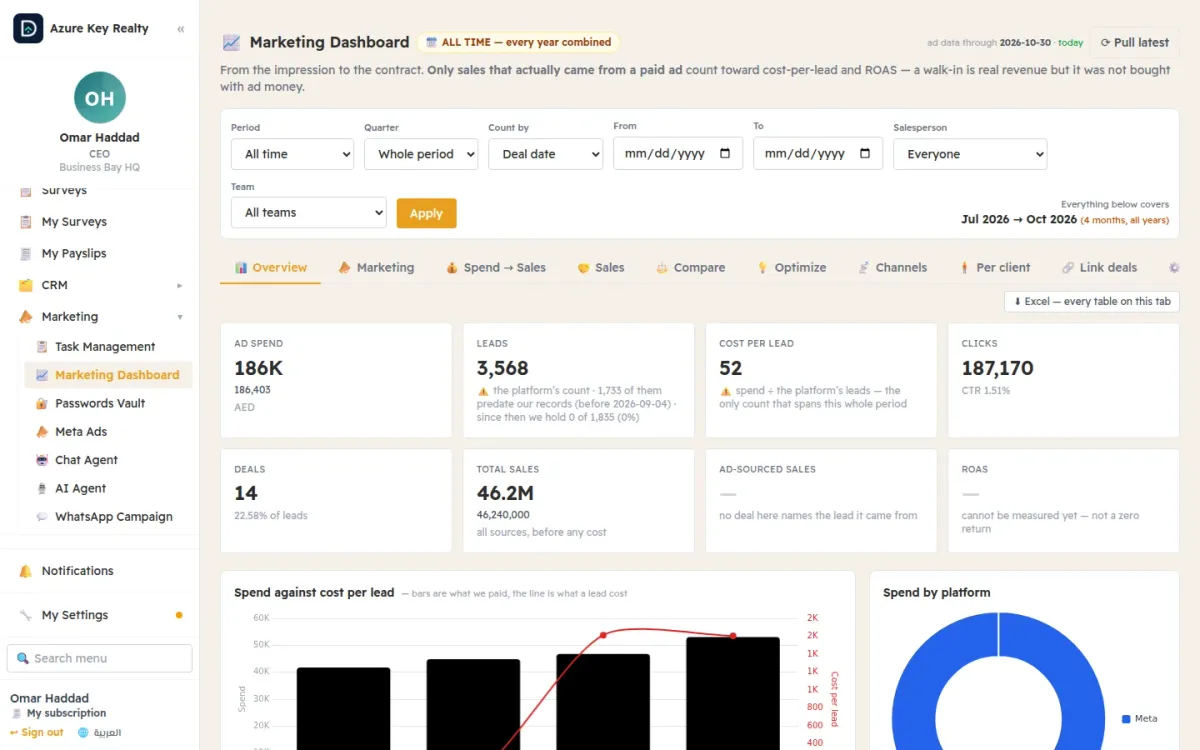
HR sits in the same portal, at different levels. Attendance & Leave starts on the Business plan and Payroll is on the Enterprise plan. The full picture of which module sits where is in Dealora's modules by team, plan and dependency, and you can browse every module to see what each does.
When separate tools are still the right call
One portal is not the answer for every office. Keep a tool separate in these cases:
- A specialist system already works. Accounting and invoicing are not in Dealora's module list, so the system your finance team trusts stays where it is.
- The handoff is rare. If a tool does one job and almost nothing has to move in or out, connecting it saves little.
- A launch is under way. Moving a team in the middle of a busy off-plan launch adds risk. Wait for a quiet week.
- The team is tiny. A solo broker or a team of up to three can run on the separate Individual plan, or on lighter tools, without the handoff problem showing up yet.
- You need one deep feature. If a single capability matters more than the integration, buy for that capability.
A mixed setup is also fair: consolidate the parts where data is re-typed most, which are usually leads, chats and reports, and leave the rest. The difference between a CRM and a full ERP is covered in how ERP and CRM differ and when a company needs one.
A short test to run before you choose
Run this on your current tools first, then on any portal you are considering. It takes an afternoon.
- Pick five real leads from the last month: two closed, two lost, one still open.
- Trace each one from the first message to today. Write down every app that holds a piece of it.
- Count re-entries. How many times was the same detail typed again?
- Ask for the history of one lead as if the salesperson had left. Time how long it takes to find the conversation, the files sent and the source of the lead.
- Build last week's report and note how many exports and people it needed.
Put the totals in hours using the formula above. If you are comparing portals, also use the eight checks before you buy a real estate CRM, and look at user limits, whether data export is included, and which modules depend on a connection you must own, such as Meta.
Start with the free Starter trial
The quickest way to judge one portal is to move one team's leads into it and run the test again. Every new Dealora company gets 3 months free on the Starter plan, which includes Employees, CRM, Developers & Projects, Projects Map and the Developer Sales index. The trial does not include data export. The Social Inbox, Marketing Dashboard and HR modules sit on higher plans, so judge them from their pages and a talk with the Dealora team about the right plan; the real estate CRM software and ERP for brokerages home page shows the whole picture. When you are ready, create a free Dealora account: 3 months free on the Starter plan. A week-by-week setup checklist for a brokerage on Dealora tells you what to load first.
Sources
Frequently asked
Is all-in-one real estate software better than separate tools?
It is better when your problem is handoffs: leads re-typed between apps, chats that never reach the CRM, and reports built by hand. Separate tools are better when one specialist system already works well, or when the team is so small that handoffs barely happen. Trace one lead through your tools to see which case you are in.
What does running a brokerage on five apps usually cost in time?
The time shows up as duplicate entry, searching for the conversation behind a lead, and rebuilding weekly reports from several exports. Count it in hours: minutes per re-entry, multiplied by leads per month. Your own count is more reliable than any average, because it reflects your tools and your team.
When should a brokerage keep separate tools?
Keep a separate tool when it does one job your team relies on and the handoff to the rest is rare, such as the accounting system your finance team already trusts. Also keep it when switching would interrupt a busy launch. Consolidate the parts where data is re-typed most often, and leave the rest.
Can I try Dealora before moving my team?
Yes. Every new company gets 3 months free on the Starter plan, which includes Employees, CRM, Developers & Projects, Projects Map and the Developer Sales index. The trial has no data export. Modules on higher plans, such as the Social Inbox or Marketing Dashboard, are judged from their pages and a talk with the Dealora team.
Does WhatsApp live inside a single portal?
In Dealora, the Social Inbox brings Facebook, Instagram and WhatsApp messages into the CRM, from the Growth plan, and it needs the company's own Meta connection. A free-form reply works only within 24 hours of the client's last message. After that, the salesperson writes from their own phone and records it with Log sent.
Related

Read next
- Real Estate Drip Campaign: Build a Follow-Up Sequence A step-by-step build of a real estate drip campaign for new property leads: the trigger, five messages over 14
- Dealora Features: Every Module by Team, Plan and Dependency A map of Dealora's 38 modules by the team that uses them: what each does, which plan includes it, what it depe
- Reactivate Old Property Leads: A 4-Step WhatsApp Plan A practical four-step plan for brokers: segment the stale lead list, write one short personal message, send it
- Lead to Deal Conversion Rate: How to Calculate It by Stage A step-by-step method to calculate your lead to deal conversion rate: fix the counting rules, follow one cohor