
Real Estate Drip Campaign: Build a Follow-Up Sequence
By Keys of Success Written Published Reviewed by Ali Darwish 13 min read
A step-by-step build of a real estate drip campaign for new property leads: the trigger, five messages over 14 days, WhatsApp template rules, stop rules and the hand-off to a salesperson.

A real estate drip campaign is a short, fixed series of messages sent to a new property lead who has not replied yet. Start it when the lead enters the first stage, send five messages over 14 days, personalize them from CRM fields, stop on reply, booking or opt-out, and hand the lead to a salesperson.
A real estate drip campaign is a short, fixed series of messages that goes to a new property lead who has not yet had a real conversation with your team. Start it when the lead enters your first CRM stage, send five messages over 14 days, fill each one from the lead's own record, and stop the moment the lead replies, books a viewing or opts out. The aim is not to send more. It is to make sure no inquiry goes quiet just because the salesperson was busy.
A well-built sequence covers the days between human contacts. For property leads it has to fit a buyer who is comparing projects, payment plans and delivery dates, not buying a one-off product.
What a real estate drip campaign does, and what it should not do
A drip campaign is a set of scheduled messages tied to a lead's situation. Each message has one job, and the whole series has an end date. It is different from a broadcast, where everyone receives the same offer on the same day regardless of where they are in the buying process.
It also does not replace the salesperson. The sequence handles the first two weeks of quiet, the days when a lead has not answered a call or has not decided whether to look at a project at all. As soon as a person writes back, the conversation belongs to a human. If you already send follow-ups by hand, the follow-up messages to send at each stage give you the wording to automate first. For the wider picture of what to automate in a smaller company, see the six marketing automation workflows to set up first; the sequence below is the property-specific version.
Step 1: Choose the CRM lead stage that starts the sequence
One trigger keeps the sequence honest: the lead has just been created in your first CRM stage, usually called New, and no salesperson has logged a conversation. Do not start it from a date alone. A lead who already spoke to a broker yesterday and then receives an automatic "Thanks for your interest" message feels ignored, not served.
Check three things before a lead enters:
- The lead has a phone number that can receive WhatsApp. A landline or a typo ends the sequence before it starts.
- The lead opted in. A form, an ad or a portal inquiry counts only if it clearly names your company and says you will message them.
- The lead is not already in another sequence or campaign. One lead, one sequence at a time.
Run the sequence only on leads you have not yet classified as hot. A buyer who has asked for a price or a viewing goes straight to a salesperson; the hot, warm and cold lead classification tells you which leads should skip the drip entirely.
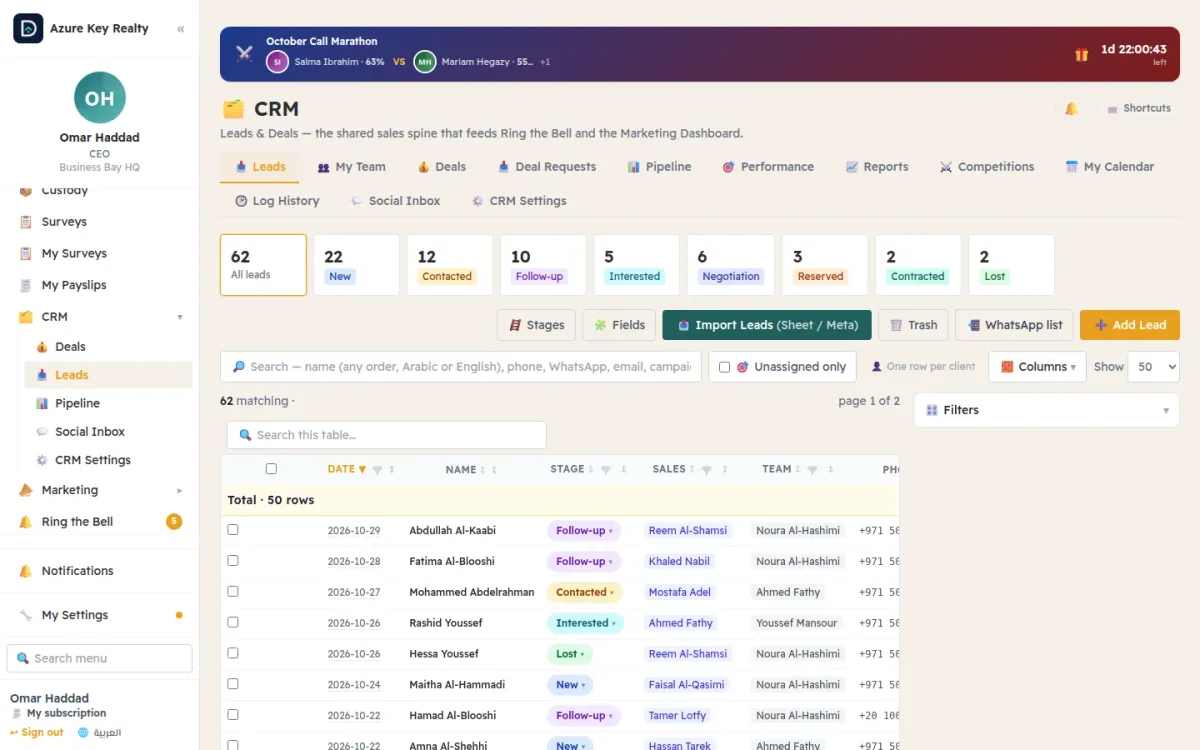
Dealora's CRM for leads, clients, deals and the pipeline is on every plan, including the 3-month free trial on the Starter plan. Its lead list shows each lead's date, stage, salesperson and team in one place. The date tells you which day of the sequence a lead is on, and the stage tells you whether they should still be in it.
Step 2: Set how many messages to send and over how many days
Five messages over 14 days is a sensible default for a new property lead. The gaps widen on purpose: early on the lead is most curious, so you stay close; later you give them room to think. Fewer than four messages rarely gives you time to offer both information and a viewing. More than five starts to feel like pressure.
| Message | Day | What it carries | Its one job |
|---|---|---|---|
| 1 | 0 | Thanks, the project they asked about, one line of detail, one easy question | Confirm you received the inquiry and start a reply |
| 2 | 2 | Project detail matched to their inquiry: unit types, location, payment plan summary | Show that the project fits what they asked for |
| 3 | 5 | A viewing offer with two possible time slots | Get a booking or a reply |
| 4 | 9 | The answer to a question leads at this stage often ask, such as the delivery timeline or the payment plan | Remove a doubt before it becomes a reason to leave |
| 5 | 14 | A polite last message asking whether to keep sending information | Close the sequence cleanly |
Schedule messages for the hours when your market actually reads messages, and avoid late evenings and your local weekend. If your team already has a speed-to-lead rule for the first reply, keep it: the sequence starts after that first human attempt, not instead of it. A speed to lead standard for real estate sets the reply time the sequence then supports.
Step 3: Decide what each message carries
The common mistake is to send the same brochure link five times with different greetings. Give each message a different job instead. A property lead nurturing sequence works when every message answers a question the buyer is probably asking at that moment.
Message 1: confirm and ask one thing
Name the project or the type of property they asked about, say a salesperson will follow up, and ask a single question they can answer in a few words, for example whether they are buying to live in or to invest. One question gets answers; three get silence. This message is usually the first contact a form or ad lead receives, so it must be an approved template (see Step 5).
Messages 2 and 4: information and an answer
Message 2 shares the facts that fit their inquiry: unit types, location and the payment plan in brief. Message 4 answers a question you know leads raise at this stage. Take both from the developer's project file in your CRM rather than writing from memory, so the details are correct and the same for every salesperson.
Message 3: the viewing offer
Offer two specific slots, not "let me know when you are free". A concrete choice is easier to accept than an open invitation. If the project is off-plan, say what the visit will actually show, such as the sales office, the model unit or the site.
Message 5: the polite close
Say you will stop sending messages unless they want more, and give a simple way to say so. Leads who reply here are often the ones who were interested but busy. Those who do not reply move to a slower route; the four-step WhatsApp plan to reactivate old property leads is the next place for them.
Step 4: Personalize from CRM fields, with fallbacks
Personalization is the difference between an automatic follow up message and a mass message. Pull only fields your team fills in reliably: the lead's first name, the project or area they inquired about, the property type, and the source of the inquiry, such as an ad or a portal. Each lead's record in the CRM is the single place those details should live.
Build a fallback for every field. If the first name is missing, open with a plain greeting rather than "Hello ,". If the project is missing, use "the property you asked about". A message with a visible empty field is worse than a message with no personalization at all. In Dealora, a template whose field is empty for a lead skips that lead at send time, so fill the field in the CRM first or leave it out of the template.
Avoid fields that feel like surveillance. Mentioning which ad they clicked is fine; quoting how many times they opened the brochure is not.
Step 5: Follow WhatsApp's template and 24-hour rules
These rules shape the whole sequence. Template messages are the only type of message a business can send to a WhatsApp user outside a customer service window, so every message in a sequence to someone who has not recently written to you must be an approved template. For a lead who arrived from a form or an ad, that includes the very first message.
A reply from the lead changes the picture. When a user responds to a marketing message, a 24-hour customer service window opens. Inside it your salesperson can write free-form replies, and marketing messages sent inside that window do not count toward the per-user marketing limit.
Three further rules matter for a drip:
- Per-user marketing limit. WhatsApp may limit how many marketing templates one person receives from any business. The limit adapts to the person's recent engagement, so it is not a fixed number. Every delivered marketing template counts toward it.
- Blocked messages. If a marketing template is blocked by this limit, it is reported with error code 131049. Meta advises waiting at least 24 hours before resending and enforces limits on excessive retries, so do not loop the same message.
- Pace to one person. A business number can send one message every 6 seconds to the same user, about 10 a minute. Exceeding that returns error code 131056. A five-message sequence never gets near it, but a second campaign running at the same time might.
Service replies also have a cost side. Since 1 October 2026 Meta charges for service messages, the free-form replies inside the 24-hour window, but each business phone number gets 1,000 free service messages a month. Unused ones do not roll over, and charging starts at the 1,001st. What a team pays depends on its volume, so count how many replies your salespeople send in a typical month.
Inside Dealora, approved templates go out through WhatsApp Campaign for bulk messages with approved templates, never one by one. Replies from leads land in the Social Inbox, where Facebook, Instagram and WhatsApp messages sit inside the CRM. The salesperson sends free-form replies there while the 24-hour window is open. After it closes, the Send button becomes "Log sent": the salesperson writes to the client from their own phone and Dealora records it. Both modules start on the Growth plan and need the company's own Meta connection: its Facebook page, Instagram and WhatsApp Business number.
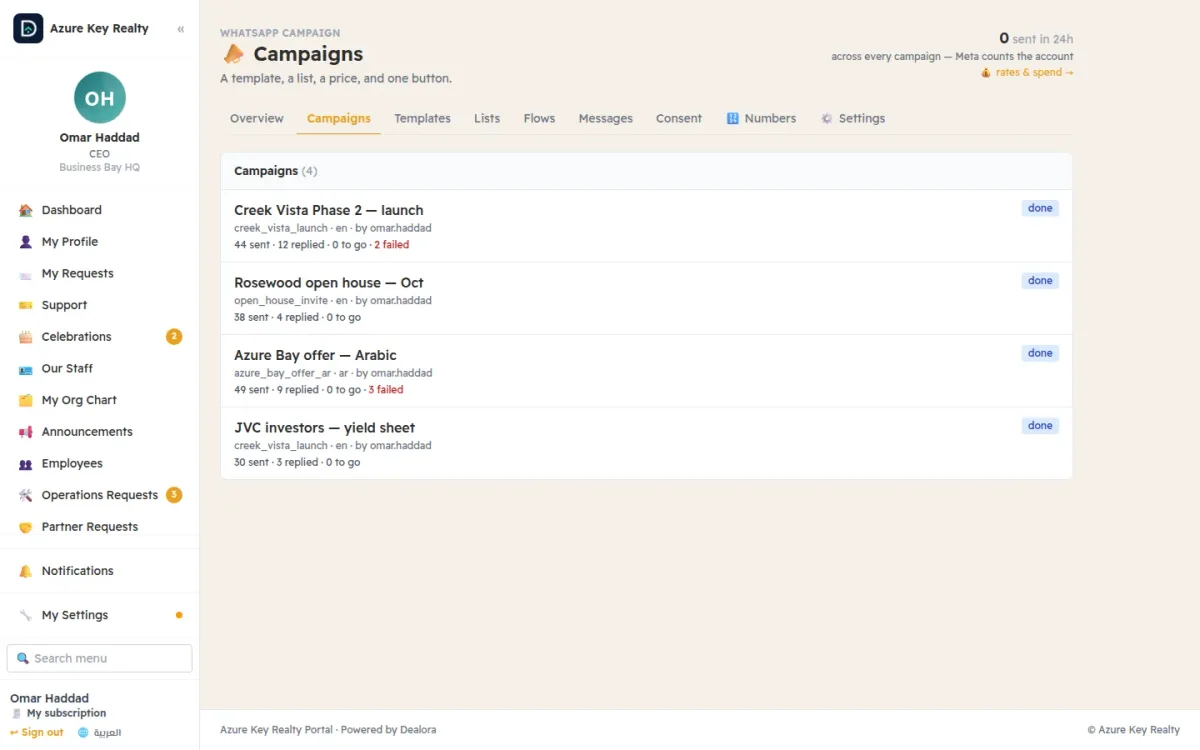
After each step, read the campaign's sent, replied and failed counts. A rising failed count is the first sign that a message is hitting the per-user limit or that the numbers on your list are not reachable.
Step 6: Set limits so the sequence never reads like a blast
A drip feels like a blast when it ignores the person receiving it. A few limits prevent that:
- A hard cap. No more than five messages per lead in one sequence, and no new sequence for the same lead for at least 30 days after it ends.
- A minimum gap. Never less than two days between two marketing messages to the same lead, whatever other campaigns are running.
- One owner for the lead's inbox. If a campaign for another project is planned, check whether the lead is already in a sequence first.
- Different content each time. No message repeats the previous one with a new greeting.
- Short messages. Two or three lines, one link or attachment, one question.
These numbers are working defaults, not Meta's rules. Adjust them after you see replies and blocks. A market where leads respond quickly, such as a new launch, can take a faster rhythm than a resale inquiry.
Step 7: Write the stop rules and the hand-off to a salesperson
The stop rules are the most important part of the sequence. Write them before you write a single message.
The four stops
- The lead replies. Stop at once, whatever the answer says, even a single "ok". The sequence has done its job.
- A viewing is booked. Replace the drip with a confirmation and a reminder, and move the lead to the viewing stage.
- The lead opts out. Treat "stop", "no thanks" or "not interested", in any wording or language, as an opt-out. WhatsApp users can also use the Offers and announcements setting to say they are not interested in marketing templates from a business, which can affect the per-user limit between you and them, and they can choose to stop delivery of marketing messages from that business altogether.
- The stage changes. If a salesperson marks the lead as called, qualified, lost or a wrong number, the sequence ends. The CRM stage, not the calendar, decides who is still in it.
Consent and opt-out under local law
Opt-in must clearly name your company, and WhatsApp's policy allows contact only when the person gave you their number and opt-in permission confirming they want messages. In Saudi Arabia, Article 29 of the PDPL Implementing Regulation requires the controller to obtain consent before using personal data to send direct marketing, to state the sender's identity clearly, to offer a way to stop that is as easy as giving consent, and to stop sending without undue delay when consent is withdrawn. In the UAE, Article 17 of Federal Decree-Law No. 45 of 2021 on the Protection of Personal Data gives a person the right to object to processing for direct marketing, including related profiling, and to stop it. Check the current text of the law that applies to your lead's country, and keep a record of when and how each lead opted in.
The hand-off
When a stop rule fires because the lead wrote back, the hand-off must be fast and complete. The salesperson who takes over needs to see the whole history: which messages the lead received, what they replied and what they asked for. Set a reply time for these leads that is shorter than for any other, since a lead who has just responded is at the most receptive point you will get.
In the Social Inbox the conversation opens with the lead's reply, so the salesperson answers inside the same thread within the 24-hour window.
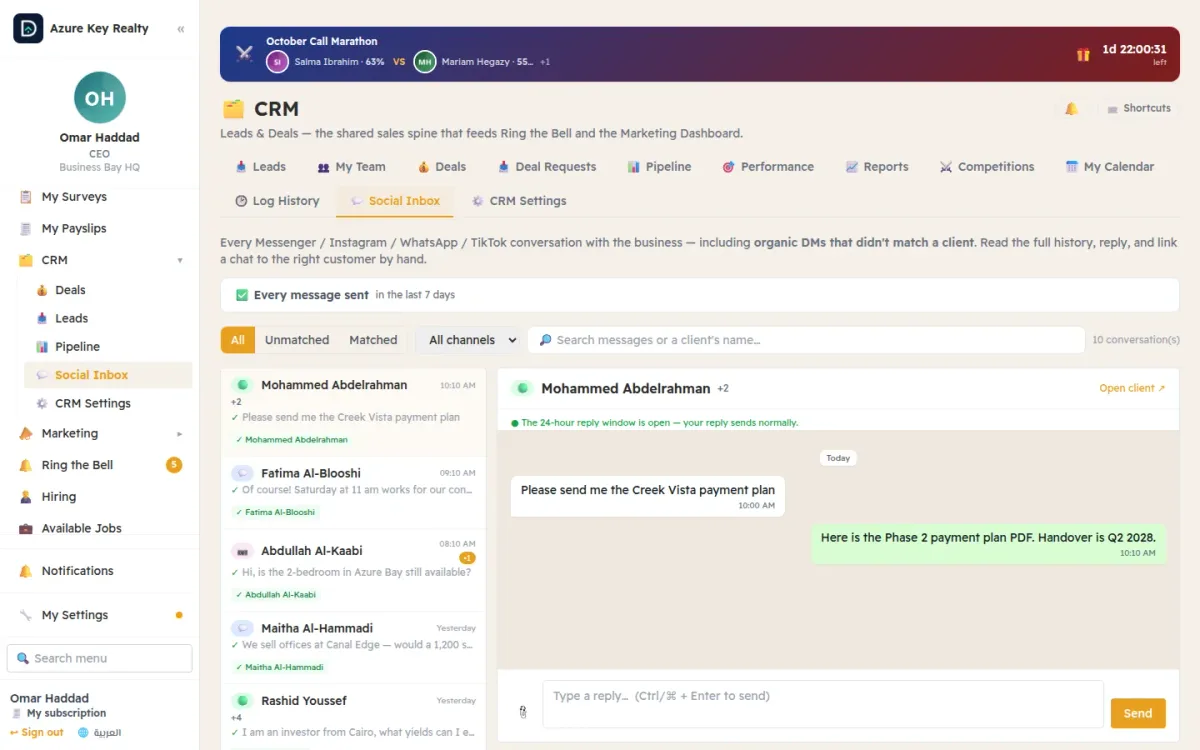
Then log the outcome in the CRM: booked viewing, needs more information, not interested. That record is what lets you judge the sequence later.
How to tell whether the sequence works
Judge the sequence on replies and viewings, not on messages sent. Track, for every batch of leads: how many replied, at which message they replied, how many booked a viewing and how many opted out. If most replies come after message 1, your first question is working and the rest may be unnecessary. If almost none reply before message 3, rewrite messages 1 and 2. If opt-outs climb, shorten the sequence or move the send times.
To connect these numbers to closed deals, split them by lead source. The five ways to turn WhatsApp chats into deals for real estate show where replies tend to turn into viewings. Keep one sequence version for at least a few weeks before you change it, otherwise you cannot tell which change helped.
Start with the lead list and the first template
You do not need five messages written on day one. Begin by writing down the trigger and the stop rules, then write message 1 and send it as an approved template. In Dealora, a WhatsApp campaign sends one approved template once, straight away or at a time you schedule, and nothing in the sequence starts or stops by itself. So build the sequence as five campaigns, each scheduled for its day and sent to a CRM filter on the stage New: a lead who replied or whose stage changed is out of the next one. A reply to a campaign is filed in the CRM by itself, and a «no» never reaches it. To build the lead records and stages first, create a free Dealora account: 3 months free on the Starter plan, which includes the CRM. WhatsApp Campaign and Social Inbox start on the Growth plan, and the Dealora team can walk you through the plan details through the Keys of Success contact page.
Sources
Frequently asked
How many messages should a real estate drip campaign have?
Five is a workable number for a new property lead: one on day 0, then days 2, 5, 9 and 14. Each message carries something different, such as project detail, an answer to a common question or a viewing offer. Past five messages without a reply, stop the sequence and move the lead to a slower reactivation routine.
Can I send a WhatsApp drip sequence to leads who filled in an ad form?
Yes, if they opted in to hear from your company and the first message is an approved template. WhatsApp allows templates as the only message type outside a 24-hour customer service window. The opt-in must clearly name your business, and local law must be followed.
What happens when a lead replies in the middle of the sequence?
Stop the sequence and let a salesperson answer. A reply opens a 24-hour customer service window in which free-form replies are allowed, and marketing messages sent inside it do not count toward the per-user marketing limit. After 24 hours, only an approved template can be sent.
Why does WhatsApp block some marketing template messages?
WhatsApp may limit how many marketing templates one person receives from any business. The limit adapts to the person's recent engagement and is not a fixed number. A blocked message is reported with error code 131049, and Meta advises waiting at least 24 hours before resending.
Do I need consent for automatic follow-up messages in the UAE and Saudi Arabia?
Collect consent before you send marketing and honor withdrawal. Under Article 29 of the Saudi PDPL Implementing Regulation, a controller must obtain consent, disclose the sender's identity and stop without undue delay when consent is withdrawn. UAE Federal Decree-Law No. 45 of 2021 gives people the right to object to direct marketing under Article 17.
Does a drip sequence replace a salesperson's calls?
No. The sequence covers the quiet days between human contacts and keeps a lead warm when nobody has spoken to them yet. Anyone who replies, asks for a price or books a viewing should move straight to a salesperson, who owns the conversation from that point.
Related

Read next
- Reactivate Old Property Leads: A 4-Step WhatsApp Plan A practical four-step plan for brokers: segment the stale lead list, write one short personal message, send it
- All in One vs Separate Real Estate Software: How to Decide Five apps for CRM, WhatsApp, ad reports, HR and files cost a brokerage hours of re-typing and lost lead histor
- Dealora Features: Every Module by Team, Plan and Dependency A map of Dealora's 38 modules by the team that uses them: what each does, which plan includes it, what it depe
- Real Estate Retargeting Tools: Which Channel Fits Each Lead Stage Cold lead, silent viewer, post-offer buyer or past client: each needs a different channel. A stage-by-stage co