
Replace Excel With Custom Software: Signs and 5 Steps
By Keys of Success Published Updated Reviewed by Ali Darwish 8 min read
Excel is fine for analysis and one-off calculations. When the same client is typed three times, anyone can edit anything and reports are built by hand, it is time to move. Here are the signs, what to keep, and five migration steps.
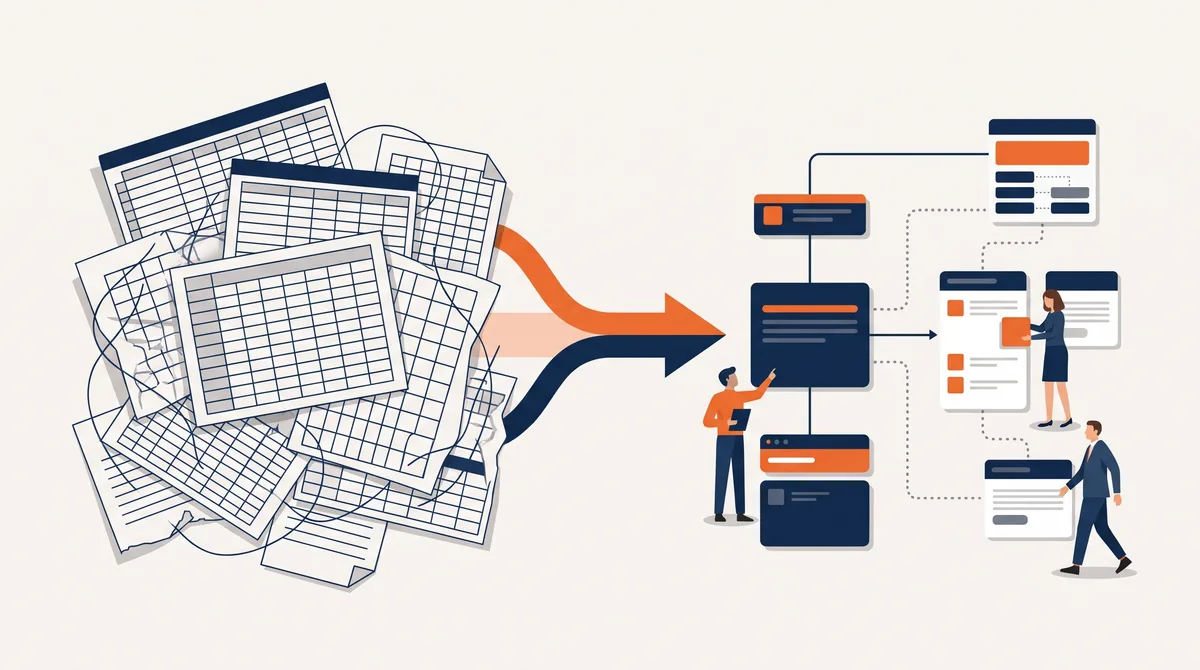
Replace Excel with custom software when the sheet has become your operating system: the same data is typed in several places, everyone sees everything, nobody can tell who changed a cell, and reports are built by hand. Keep Excel for analysis. Migrate one process at a time: map the sheets, clean the data, pick one process, run both in parallel, then retire the sheet.
You should replace Excel with custom software when the spreadsheet is no longer a tool but the place where your operations actually live: clients, staff, requests and approvals. The warning signs are practical. The same data is typed in several places, anyone can open and change anything, nobody can see who edited a cell, and every report is assembled by hand at month end. Excel stays useful for analysis. What changes is that your daily records move into a system with rules.
When to stop using Excel: six signs
Excel does not fail suddenly. It fails slowly, and the cost shows up as staff hours and lost follow-ups before anyone calls it a problem. These are the six signs to look for in your own sheets.
1. The same record is typed more than once
A client appears in the sales sheet, again in the invoicing sheet and a third time in a chat group. When the phone number changes, one copy gets updated. Soon nobody knows which version is right.
2. Everyone sees everything
A spreadsheet has one level of trust: whoever has the file has all of it. A salesperson can open the salary sheet that sits in the same shared folder, and a junior employee can delete a column by accident. Real permissions, where each role sees only what it needs, are hard to fake in a file.
3. There is no history
A price changed, a status was reset, a leave day disappeared. When you ask who did it and when, the honest answer is that nobody knows. Without a trail, disputes are settled by memory.
4. Reports are built by hand
Someone collects five files at the end of the month, pastes them together and sends management a summary. By the time it arrives the numbers are weeks old. A system answers the same question on any day, because the data is already in one place.
5. The file has become slow, heavy or fragile
A worksheet holds at most 1,048,576 rows by 16,384 columns in the current .xlsx format. The older .xls format from Excel 97 to 2003 stops at 65,536 rows by 256 columns. Size limits are only part of it. Slow files, broken formulas after a sort and copies named "final_v7_new" are the everyday signs that a sheet is carrying more than it was built for.
6. You trust numbers nobody has tested
In a review of field audits published in 2000, spreadsheet researcher Raymond Panko of the University of Hawaii reported errors in 91% of the 54 real spreadsheets audited from 1997 onward, and cell error rates of 1.1% to 2.5% in the most careful audits. He also found that companies rarely set strict rules for building and testing spreadsheets. If payroll, commissions or stock depend on formulas typed by hand, that risk is yours.
Personal data adds a legal side for companies in Egypt. Under Personal Data Protection Law No. 151 of 2020, whose Executive Regulations were issued in November 2025, a controller or processor must notify the Personal Data Protection Center within 72 hours of becoming aware of a personal data breach, and must keep a personal data log recording the categories of data, who it is shared with, retention periods and the security measures used. A client list that travels by email and personal phones makes both duties hard to meet. Confirm your own obligations with a legal adviser.
What to keep in Excel
Moving to a system does not mean banning spreadsheets. Excel is an excellent tool for work that is temporary, personal or analytical. Keep it for:
- One-off analysis, such as testing a pricing idea or comparing two quotes.
- Financial models and forecasts that one person owns and explains.
- Exports from your system that you want to slice in your own way.
- Small lists that no one else depends on.
The test is simple. If a sheet is a calculator, keep it. If a sheet is a database that several people edit every day, it belongs in a system.
Excel vs custom business software
The comparison below is about daily operations, not about which tool is better in general.
| Question | Shared Excel files | Custom business software |
|---|---|---|
| Entering data | Typed again in each file | Entered once, used everywhere |
| Who can see what | Whoever holds the file | Set by role |
| History of changes | Usually none | Can be recorded for each action |
| Approvals | Voice notes and messages | Built into the workflow |
| Reports | Assembled by hand | Live from your own data |
| Cost to start | Almost nothing | A planned project |
| Best for | Analysis and calculations | Records many people work on daily |
Excel wins on the first day because it costs nothing and needs no planning. Software wins from the moment more than a few people depend on the same data. That is the point where an alternative to Excel for business becomes a saving rather than an expense.
How to replace Excel with custom software in five steps
A spreadsheet to software migration goes wrong when a company tries to replace every sheet in one weekend. The order below keeps the business running while the change happens.
Step 1: Map the sheets
List every spreadsheet that holds operational data. For each one, write down who creates it, who edits it, who reads it, where the data comes from and which report it feeds. Include the sheets that live on personal laptops, and mark any data that appears in more than one file.
Step 2: Clean the data
Merge duplicate clients, fix phone number formats, standardize names of statuses and remove rows nobody uses. This is the least visible step and it decides whether the new system is trusted. Importing messy data only moves the mess to a new address.
Step 3: Pick one process first
Choose the process that costs the most, usually the one where leads are lost or reports take days. Agree how you will measure the result: hours saved, response time or fewer errors. A first win in one department makes the next team ask to move.
Step 4: Run both in parallel
For one full cycle, such as a month of attendance or a full sales cycle, keep the old sheet and the new system side by side. Compare the numbers. Differences show missing fields, wrong rules or habits the team has not yet changed. Fix them while the sheet is still there as a safety net.
Step 5: Retire the sheet
When the team relies on the system and the numbers match, make the old file read-only and move it to an archive. Tell everyone clearly that new entries go only into the system. A sheet that stays editable will keep collecting data, and you will be back to two versions.
A real example: leads, HR and attendance in one portal
We built Dealora, a real estate ERP, because brokerages ran on exactly this mix: a CRM for leads, a spreadsheet for developers, chat groups for each developer's salespeople and paper for HR. Management saw the full picture only when someone built it by hand. Dealora puts those pieces into one portal in Arabic and English.
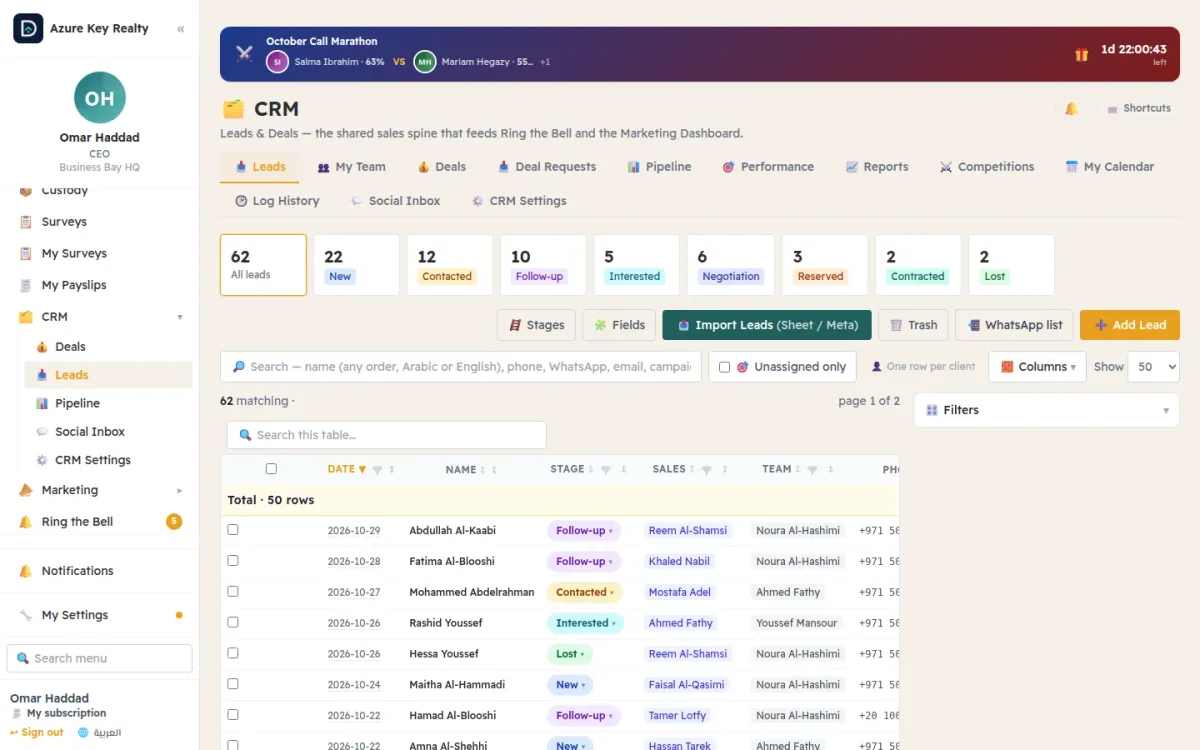
Take leads first. The CRM module holds leads, clients, deals, the pipeline, sources and reports, so a client is entered once and every salesperson works from the same record. The lead list shows each lead's stage, date, salesperson and team, which is what a sales sheet tried to do with colors and filters.
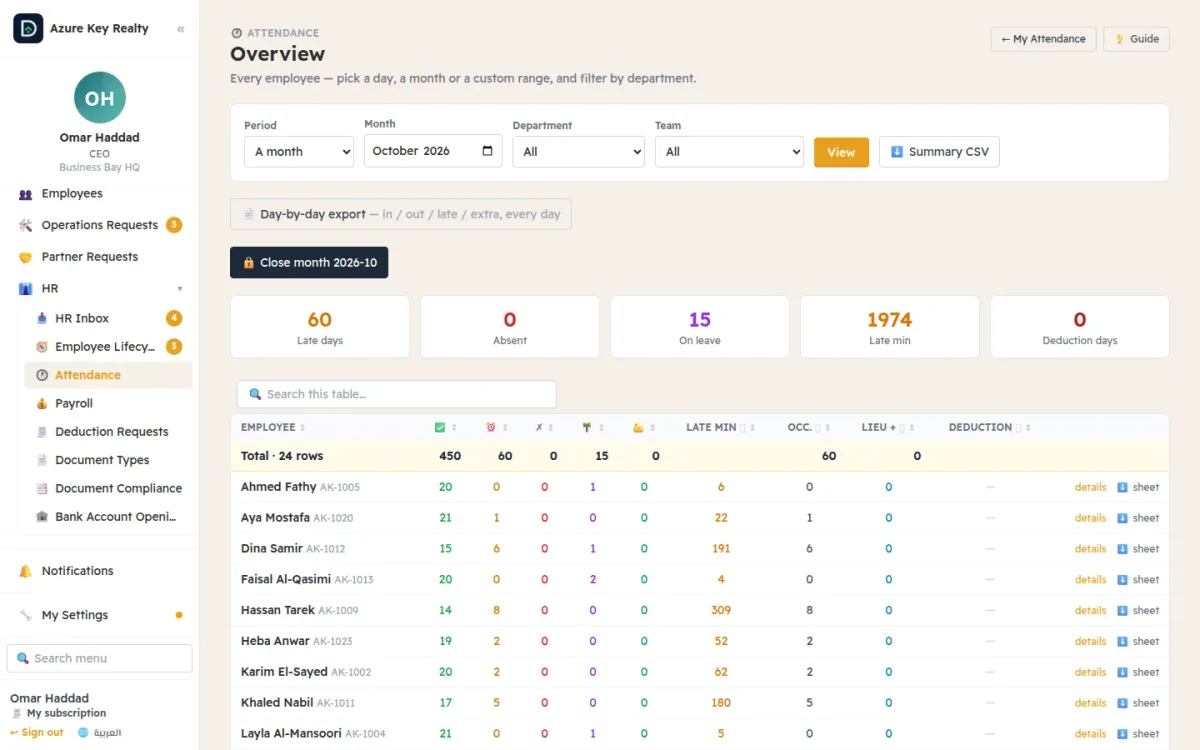
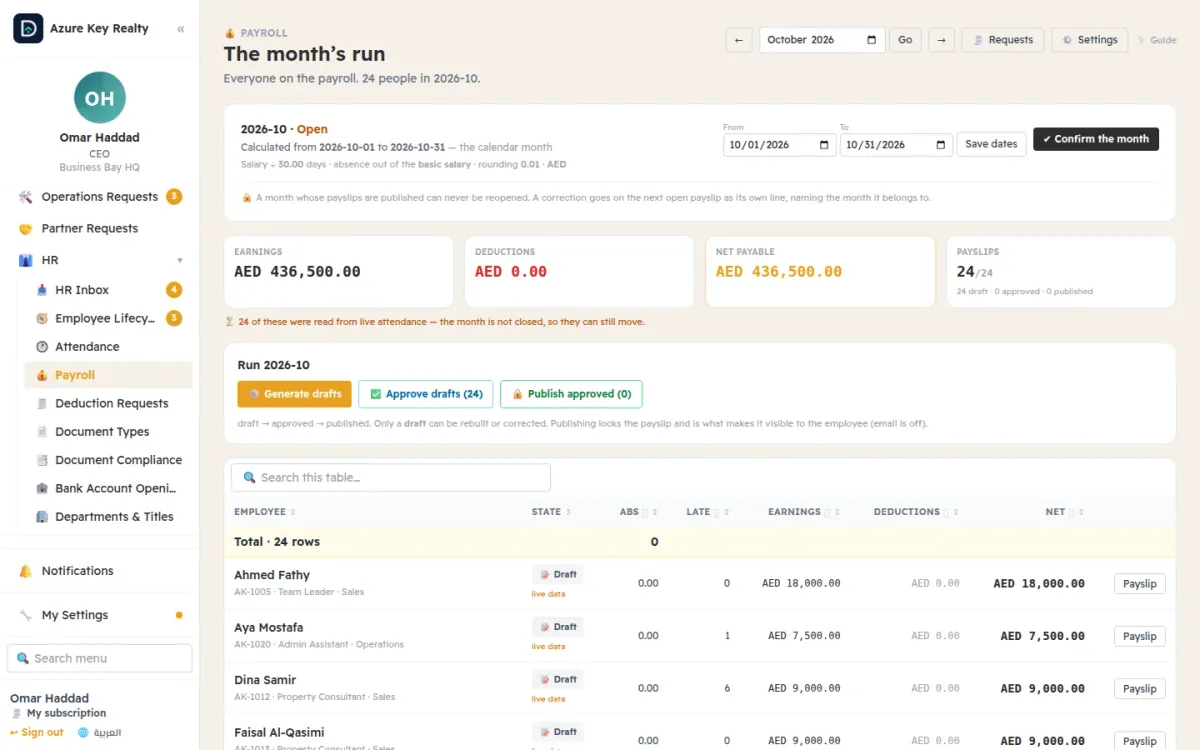
HR followed the same path. Attendance and leave replaces the paper form and the month-end typing: staff check in and out from a mobile phone, and the system handles shifts, leave types, holidays, deductions and monthly reports. On the Enterprise plan, Payroll then runs from the same records, with salaries, allowances, advances, bonuses and deductions, instead of a separate sheet rebuilt every month.
Permissions are part of the design too, so an employee, a team leader and a manager each see what their role allows. Attendance and Leave is on the Business plan and above, and Payroll is on Enterprise. Every new company starts with a free 3-month trial on the Starter plan, which covers the CRM, employees, developers and projects, so a sales team can test its own lead process before deciding anything. A brokerage that wants the wider picture can read about how sales, HR and marketing work together in one real estate ERP.
Ready-made tool or custom build?
Not every sheet needs custom software. If your process is standard, such as leads, leave or attendance, a ready-made system is often the faster path. Custom software makes sense when your approval chain, your data rules or your reports are different from what a general tool expects, or when staff end up copying data between tools anyway.
Our software development service starts from a workflow map and a written scope, delivers one module at a time with a review after each, and stays with the system after launch. If the bigger problem is how work moves across the whole company, digital transformation consulting looks at the processes first and the tools second. Companies that want to automate repeated steps once the data is clean can start with eight tasks small businesses can automate first.
If you decide to build, the choice of partner matters as much as the choice of software. The questions in how to choose a software company in Egypt help you check scope, support and ownership before you sign.
Where to start this week
Open the shared folder and list the five spreadsheets your team edits most often. Next to each, write the name of the person who owns it and the report it feeds. The sheet that causes the most retyping and the most late reports is your first migration candidate. When you are ready to talk it through, tell us which process you want to change and we will start from your own workflow.
Sources
Frequently asked
When should a business stop using Excel?
Stop using Excel as your operating system when the same record is typed in more than one place, when every employee can see and edit everything, when nobody can trace who changed a value, and when management waits for a hand-built monthly report. Keep it for analysis and one-off calculations.
What is the best alternative to Excel for a business?
It depends on the process. A ready-made tool such as a CRM or an attendance system fits standard work. Custom software fits processes with their own approval chain or data rules. Many companies use both, and keep Excel only for analysis and quick calculations.
How do I move from spreadsheets to a system without stopping work?
Move one process at a time. Map every sheet and who edits it, clean the data, choose the single process that costs the most, run the sheet and the new system side by side for one full cycle, then retire the sheet and make it read-only.
Is Excel limited in the number of rows?
Yes. A modern .xlsx worksheet holds at most 1,048,576 rows by 16,384 columns. The older .xls format from Excel 97 to 2003 is limited to 65,536 rows by 256 columns. Size is only one question: accuracy, access control and change history matter just as much for operational records.
Do spreadsheets create legal risk for personal data in Egypt?
They can. Egypt's Personal Data Protection Law No. 151 of 2020 requires a personal data log and notification of a breach within 72 hours. A sheet copied between inboxes and phones makes it hard to say who has the data. Check your own obligations with a legal adviser.
Related

Read next
- What Is Dealora? A Plain Guide to the Real Estate Portal Dealora is the AI-powered real estate ERP built and run by Keys of Success. Here is who it is for, what each m
- Real Estate Drip Campaign: Build a Follow-Up Sequence A step-by-step build of a real estate drip campaign for new property leads: the trigger, five messages over 14
- How to Get Real Estate Referrals: A Post-Closing Routine Referrals come from a routine, not a favor. Tag every closed deal, schedule follow-ups after handover, ask at
- All in One vs Separate Real Estate Software: How to Decide Five apps for CRM, WhatsApp, ad reports, HR and files cost a brokerage hours of re-typing and lost lead histor