
What Is Dealora? A Plain Guide to the Real Estate Portal
By Keys of Success Published Reviewed by Ali Darwish 8 min read
Dealora is the AI-powered real estate ERP built and run by Keys of Success. Here is who it is for, what each module does, which plans include it and how to start free.

Dealora is an AI-powered real estate ERP built and run by Keys of Success for real estate brokerages. It puts the CRM, developers and projects, social messaging, marketing, HR and payroll in one Arabic and English portal. Every new company gets a free 90-day trial on the Starter plan.
What is Dealora? It is an AI-powered real estate ERP that we at Keys of Success built and run for real estate brokerages in Egypt, Saudi Arabia and the UAE. It puts the CRM, developers and projects, social messaging, marketing, HR and company administration into one portal, in Arabic and English. The product page has the short summary; what follows is the plain version, written by the team that maintains it.
What is Dealora, and who is it for?
It is real estate brokerage software for brokers, sales companies and the teams behind them. A broker or small office can use it to keep clients, developers and projects in one place. A growing sales company can add its social messages, WhatsApp campaigns and marketing numbers next to its leads. A full company can run hiring, attendance, requests and policies in the same portal, and a large company can bring every department into one system with one view for management.
The portal is not a general business tool with a real estate template on top. It is organized around how a brokerage actually sells: many developers, each with projects, phases and files, and salespeople who send unit files and brochures to clients every day, mostly over WhatsApp.
Why we built it
In many brokerages, the tools grow one at a time. A CRM holds the leads, a spreadsheet holds the developers, chat groups hold each developer's salespeople, and HR runs on paper. Management sees the full picture only when someone assembles it by hand at the end of the month.
The portal exists so the same company can run all of that from one place, with one login and one set of permissions. That is the whole idea. If you are weighing it against other systems, our checklist in Real Estate CRM Comparison: 8 Checks Before You Buy works for any product, ours included.
What sits inside the portal?
The modules are grouped by the part of the company they serve, and there are 38 in total. The table maps the ones brokerages ask about most.
| Area | Module | What it does | Lowest plan |
|---|---|---|---|
| Core | Employees | Departments, job titles, permissions, profile cards, Our Staff | Starter |
| Core | CRM | Leads, clients, deals, the pipeline, sources, reports | Starter |
| Core | Developers & Projects | Developers, their projects, phases and files | Starter |
| Core | Projects Map | Projects on a map, the project board, sending project files to a client | Starter |
| Core | Developer Sales index | The salespeople at each developer and their numbers | Starter |
| Sales | Social Inbox | Facebook, Instagram and WhatsApp messages inside the CRM | Growth |
| Sales | WhatsApp Campaign | Bulk WhatsApp campaigns with approved templates | Growth |
| Sales | AI Sales Agent | AI phone calls with the recording and a verdict on each call | Add-on from Starter |
| Marketing | Marketing Dashboard | Spend to leads to sales: cost per lead, return on ad spend | Growth |
| HR | Attendance & Leave | Mobile check-in and out, shifts, leave, monthly reports | Business |
| HR | Payroll | Salaries, allowances, advances, bonuses, deductions, monthly payslip run | Enterprise |
Other modules cover competitions, deal celebrations, brochures, task management, hiring, surveys, announcements and more. The product page lists all of them under the full module list.
How does the sales side work?
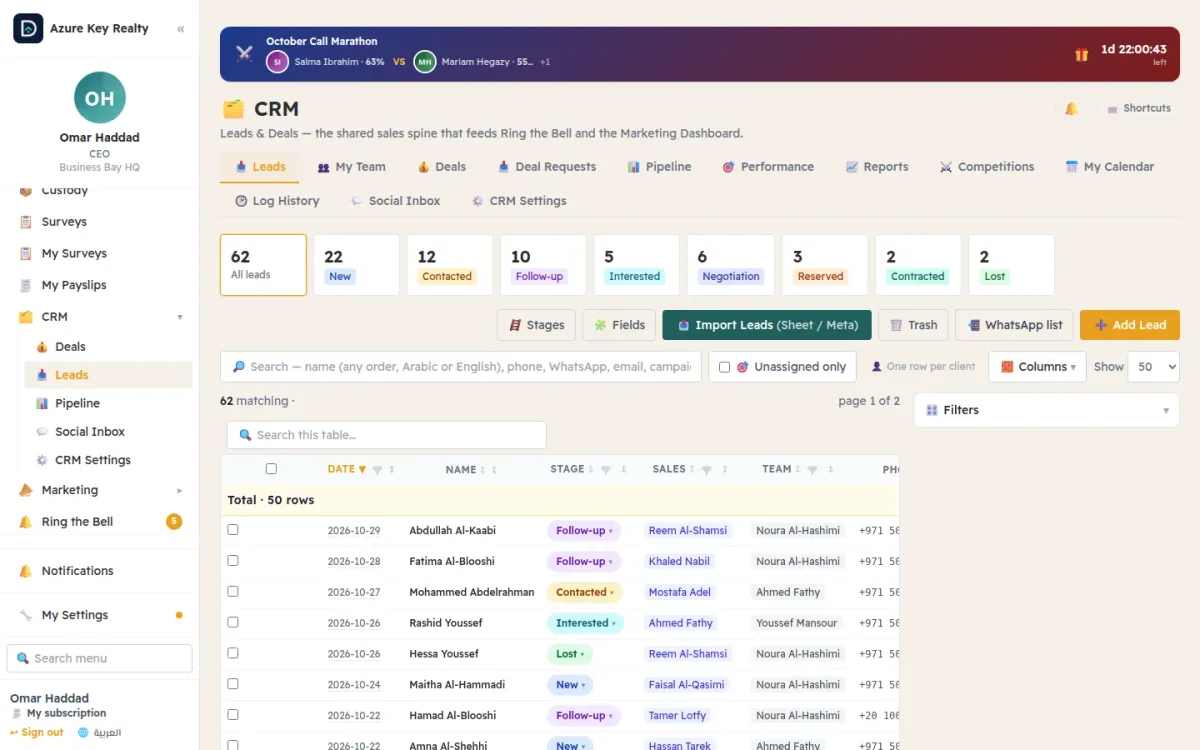
Everything starts in the CRM, where leads, clients, deals and the pipeline live, with sources and reports on top. Developers and their projects sit beside it, so a salesperson answering a client can open the project, its phases and its files without leaving the portal.
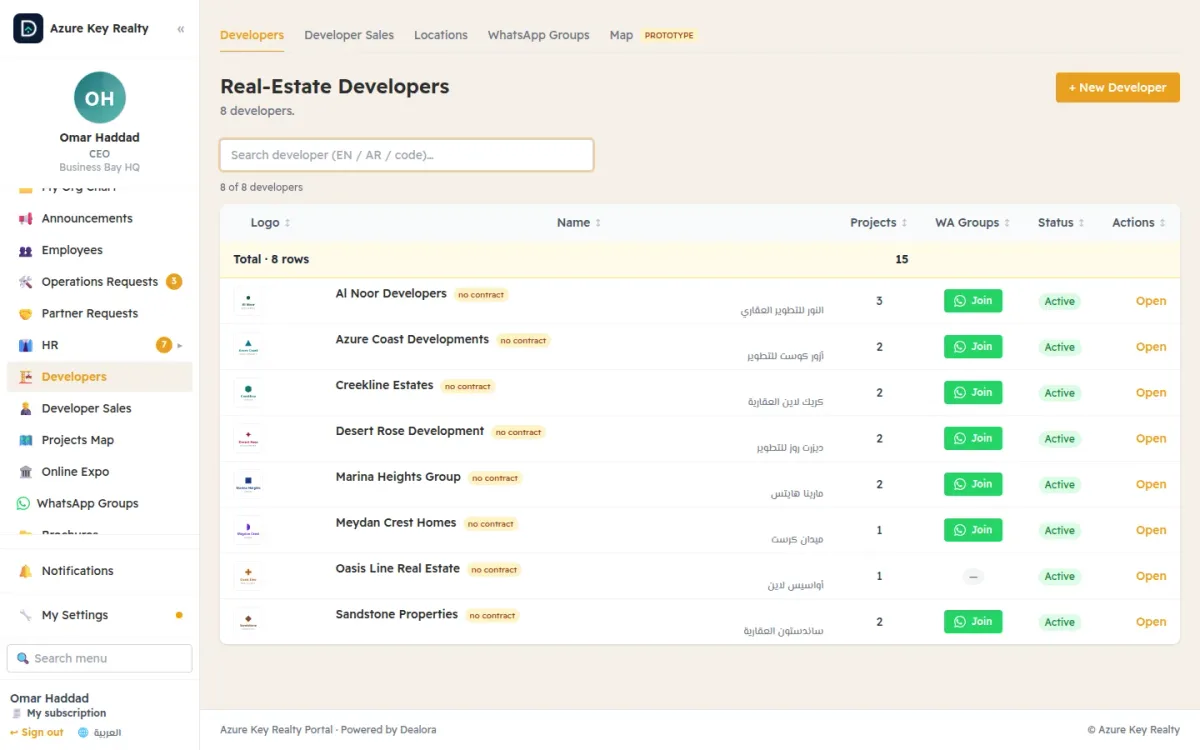
The developers list holds each developer with its project count. The Projects Map shows projects on a map and lets a salesperson send project files to a client. The Developer Sales index lists the salespeople at each developer and their numbers, so you can reach the right contact fast. These modules, together with Employees, are the ones included in the free Starter account.
Messages and campaigns
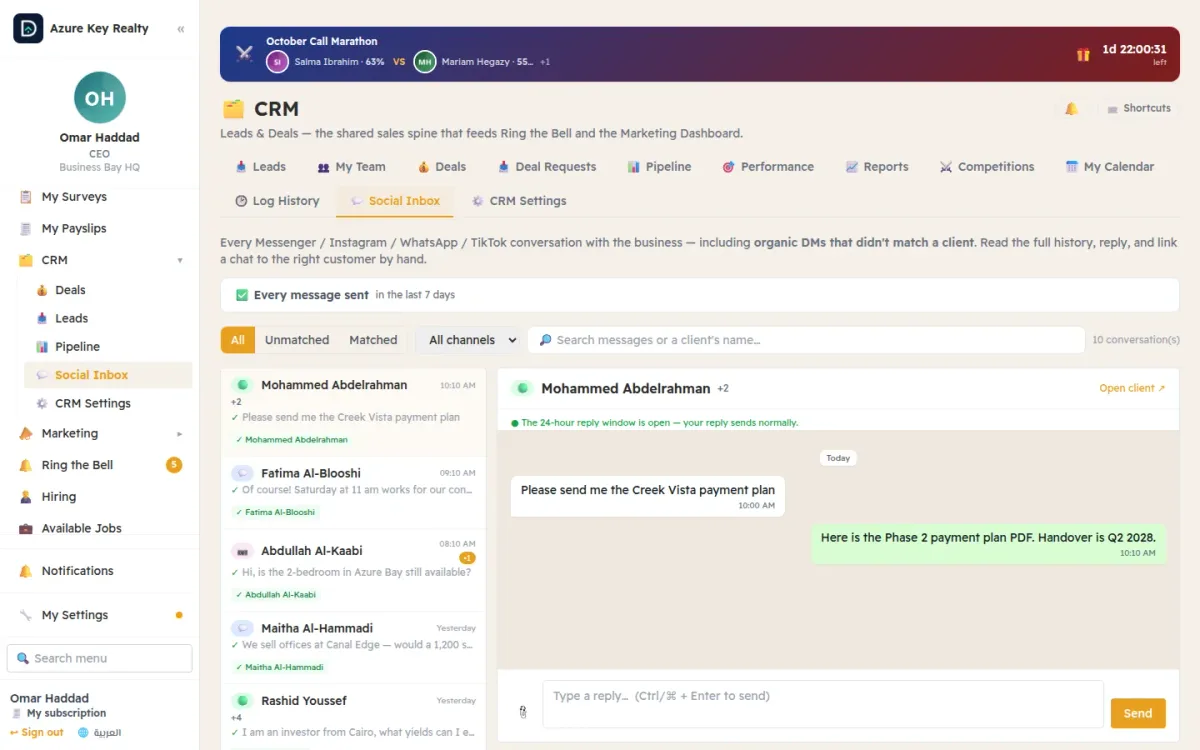
The Social Inbox brings Facebook, Instagram and WhatsApp messages into the CRM, so conversations stay attached to the lead. It is included from the Growth plan. WhatsApp Campaign, also from Growth, sends bulk campaigns with approved templates. The Chat Agent, from Growth as well, answers customers on Instagram, Messenger, WhatsApp and TikTok from the company's own Knowledge and passes only real customers to the CRM. It works only together with the AI Sales Agent add-on and the company's own Meta connection.
AI phone calls
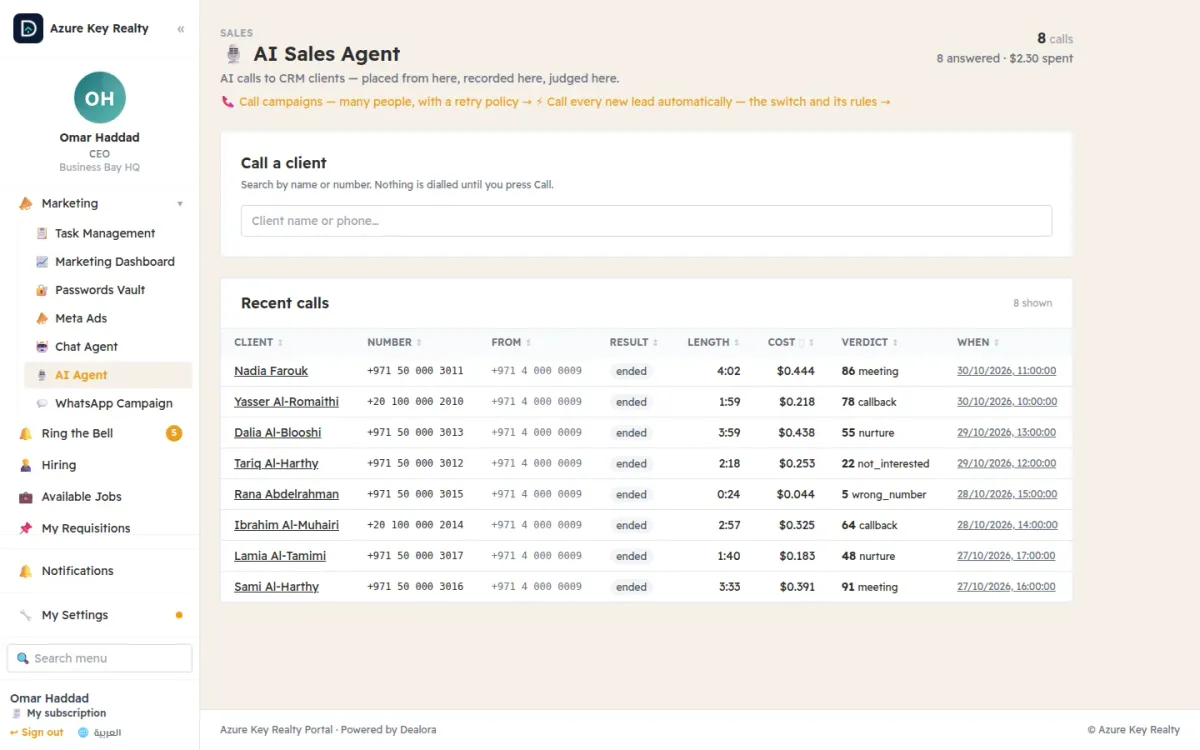
The AI Sales Agent makes phone calls to clients and keeps the recording and a verdict on each call, with call length and cost shown in the history. It is an add-on available from the Starter plan, charged as a monthly subscription plus usage. Calls cost by usage, so budget by expected call volume rather than by user count.
What about marketing, HR and payroll?
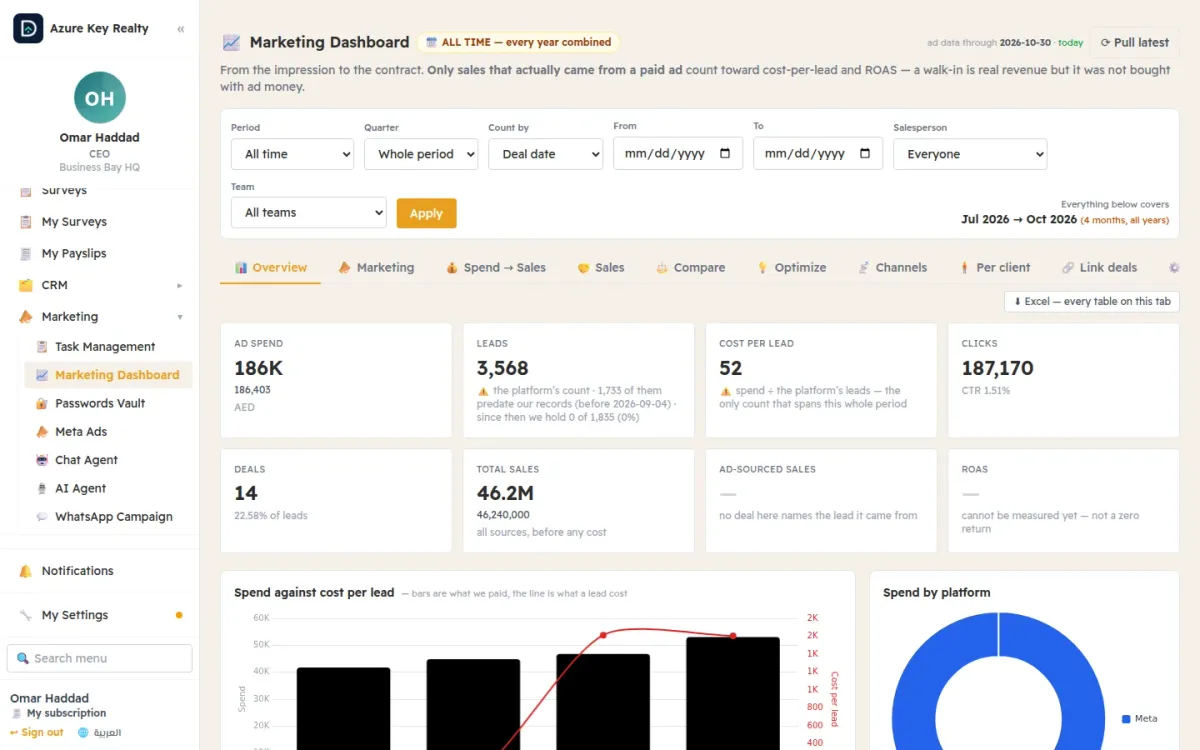
The Marketing Dashboard follows money from ad spend to leads to sales, showing cost per lead and return on ad spend. It is included from the Growth plan. Meta Ads, which plans live campaigns with AI and holds every launch for a person's approval, is included on Enterprise and available as an add-on from Growth. Task Management and the Passwords Vault round out the marketing group; the vault starts on Business.
On the HR side, hiring with a careers page, attendance and leave, employee lifecycle, HR and operations requests, policies and document follow-up start on the Business plan. Payroll is on the Enterprise plan: salaries, allowances, advances, bonuses and deductions, with the monthly payslip run.
What does it replace in a typical brokerage tool stack?
The aim is to replace the pile of separate tools, not to sit on top of them. A typical brokerage stack and its counterpart in the portal look like this:
- A standalone CRM for leads: the built-in CRM.
- A spreadsheet of developers, projects and salespeople: Developers & Projects and the Developer Sales index.
- Scattered WhatsApp, Instagram and Facebook inboxes: the Social Inbox, from Growth.
- Separate reporting for ad spend and cost per lead: the Marketing Dashboard, from Growth.
- Paper or spreadsheet HR and salary sheets: the HR modules from Business and Payroll on Enterprise.
If you want to see what your own stack looks like before deciding, the tool-by-tool audit in Real Estate Tech Stack: A Tool-by-Tool Audit for Brokerage Owners is a good first hour of work.
Which modules need a higher plan?
There are five plans: Starter (up to 10 users, no data export), Growth (up to 50 users, with export), Business (up to 150 users, with export), Enterprise (no user limit, with export) and Individual (up to 3 users, no data export). The rule of thumb is simple. Starter has the core five modules. Growth adds Social Inbox, WhatsApp Campaign, Developer WhatsApp Groups, Brochures, the Marketing Dashboard, Task Management, Competitions, Ring the Bell and the Chat Agent. Business adds most HR modules and the Passwords Vault. Enterprise adds Payroll, Ring the Bell Production and Bank Account Opening.
Some capabilities are add-ons rather than plan features: the AI Sales Agent from Starter, Meta Ads and Online Expo from Growth, plus extra users, extra storage, branches in other countries, Meta connection setup, a company website connected to the CRM and White Label from Starter. Plan amounts come from the sales team, not from a public list, so ask them about contents, user limits and add-ons for your size of team.
What stays outside the software?
The portal runs your sales operation. It does not license your business, and the rules of each market and platform remain yours to follow. Three examples brokerages often ask about:
- Egypt: amendments issued in January 2026 to the executive regulation of Law 120 of 1982 created an official mandatory register of real estate brokers. A 6-month grace period ended in July 2026, so only registered brokers may practise.
- Saudi Arabia: a broker needs a FAL brokerage and marketing licence. For an individual broker the fee is SAR 300 per year, and fees vary by applicant type, so check the current figure with the regulator.
- Dubai: real estate advertising needs a permit from the Dubai Land Department. Standard permits list at AED 1,000, plus an AED 20 Knowledge and Innovation Fee, and the fee differs by permit type.
The same applies to messaging. On the WhatsApp Business Platform, a free-form reply is allowed only within 24 hours of the client's last message; after that only an approved template gets through, and only to users who opted in. Meta gives each business phone number 1,000 free service messages a month and charges from the 1,001st, a change that took effect on 1 October 2026. Check Meta's own pages for the current rules before you plan campaign volumes.
How do you start with the free 3-month Starter account?
Every new company gets 90 days free on the Starter plan. The trial holds Employees, CRM, Developers & Projects, Projects Map and the Developer Sales index, without data export. Social Inbox, the Marketing Dashboard and Payroll are not part of it, so plan your test around the core five.
- Open a Dealora free trial account for your company.
- Add your team in Employees, with departments and permissions.
- Import or enter your current leads into the CRM and set your pipeline stages.
- Add the developers you sell for and their projects, then open the Projects Map and the Developer Sales index.
- Run real leads through it for a few weeks and note what your team still does outside the portal. That list tells you which higher plan or add-on is worth asking about.
The Starter account allows up to 10 users, which is enough to test with a real sales team. If you want a modular view of the whole portal first, the real estate CRM software and ERP for brokerages page shows the product from the other side. Questions about plans or about a fit for your company go to our contact page.
Sources
Frequently asked
What does Dealora do in one sentence?
Dealora is an AI-powered real estate ERP, built and run by Keys of Success, that puts a brokerage's CRM, developers and projects, social messages, marketing, HR and company administration in one portal. It works in Arabic and English and suits both small offices and large companies.
Is Dealora only a CRM?
No. The CRM for leads, clients, deals and the pipeline is the core, but Dealora also covers developers and their projects, a projects map, social messaging, WhatsApp campaigns, marketing numbers, AI phone calls, hiring, attendance, payroll and company-wide announcements. These sit in one portal.
Is there a free trial of Dealora?
Yes. Every new company gets 90 days free on the Starter plan. The trial holds Employees, CRM, Developers & Projects, Projects Map and the Developer Sales index, without data export. Modules such as Social Inbox or Payroll sit on higher plans.
Which Dealora plan includes the Social Inbox and the marketing dashboard?
Social Inbox and the Marketing Dashboard are both included from the Growth plan upward, so Growth, Business and Enterprise. They are not part of the free Starter trial. Payroll is on the Enterprise plan, and the AI Sales Agent is an add-on available from Starter.
How many users can each Dealora plan have?
Starter allows up to 10 users, Growth up to 50, Business up to 150 and Individual up to 3. Enterprise has no user limit. Extra users are an add-on from Starter. Amounts come from the Dealora team, so contact them for pricing.
Related

Read next
- Software for Dubai Property Agencies: 7 Tests Before You Buy A Dubai-specific checklist for choosing agency software: seven tests on your own client list, developer data,
- Real Estate Drip Campaign: Build a Follow-Up Sequence A step-by-step build of a real estate drip campaign for new property leads: the trigger, five messages over 14
- All in One vs Separate Real Estate Software: How to Decide Five apps for CRM, WhatsApp, ad reports, HR and files cost a brokerage hours of re-typing and lost lead histor
- Lead to Deal Conversion Rate: How to Calculate It by Stage A step-by-step method to calculate your lead to deal conversion rate: fix the counting rules, follow one cohor