
Reactivate Old Property Leads: A 4-Step WhatsApp Plan
By Keys of Success Published Updated Reviewed by Ali Darwish 10 min read
A practical four-step plan for brokers: segment the stale lead list, write one short personal message, send it in small WhatsApp batches, then log replies and bring responders back into the pipeline.

To reactivate old property leads, work in four steps: audit and segment the list by last contact and stated need, write a short personal message with a real reason to reply, send it in small batches through approved WhatsApp templates, then log every reply and move responders back into the pipeline. Honour opt-outs the same day.
To reactivate old property leads, you do not need new ads or a bigger budget. You need the list you already own, sorted properly, and one short message that gives each person a reason to answer. The plan below has four steps: audit and segment the list, write a personal message, send it in small batches through approved WhatsApp templates, then log replies and move responders back into the pipeline.
Why you should reactivate old property leads
Every brokerage has the same pile: enquiries from a launch two years ago, clients who went quiet after a viewing, people who said "not now". Most of them are not lost. Their budget, timing or family situation changed, and nobody was in touch when it did.
Property is a long buying cycle, and a lead who ignored you in March may be ready in October. Staying useful to people who are not ready yet is real estate lead nurturing in its simplest form. If you want the map of where a buyer might be, our article on property buying cycle stages shows the stages and the CRM statuses that go with them.
Step 1: Audit and segment the stale lead list
Do not message the whole list. A blanket send to ten thousand names is how a number gets blocked and reported. Spend a day sorting first, and the rest of the plan gets easier.
Sort by last contact
Export the list from your CRM with the date of the last real conversation, not the date the lead was created. Then split it into bands that match how you work, for example recent (up to three months), cooling (three to twelve months) and old (over a year). Recent leads need a normal follow-up call, not a campaign. The cooling and old bands are where a reactivation message earns its keep.
Sort by stated need
Within each band, group leads by what they told you: area, unit type, budget range, and whether they wanted to live in the unit or invest. A lead with no recorded need goes in its own group, because the first message to them has to ask rather than offer. If your notes on need are thin, the questions in our list of real estate lead qualification questions show what to capture the next time someone replies.
Remove who should not be messaged
Take out anyone who bought through you or another broker, anyone who asked to stop, duplicate records, and wrong or dead numbers. Then check consent. A customer who messaged you first has not thereby agreed to receive business-initiated messages later, and the opt-in has to name your business. Leads with no consent record go to a phone call or a manual one-to-one reply, not to a template send.
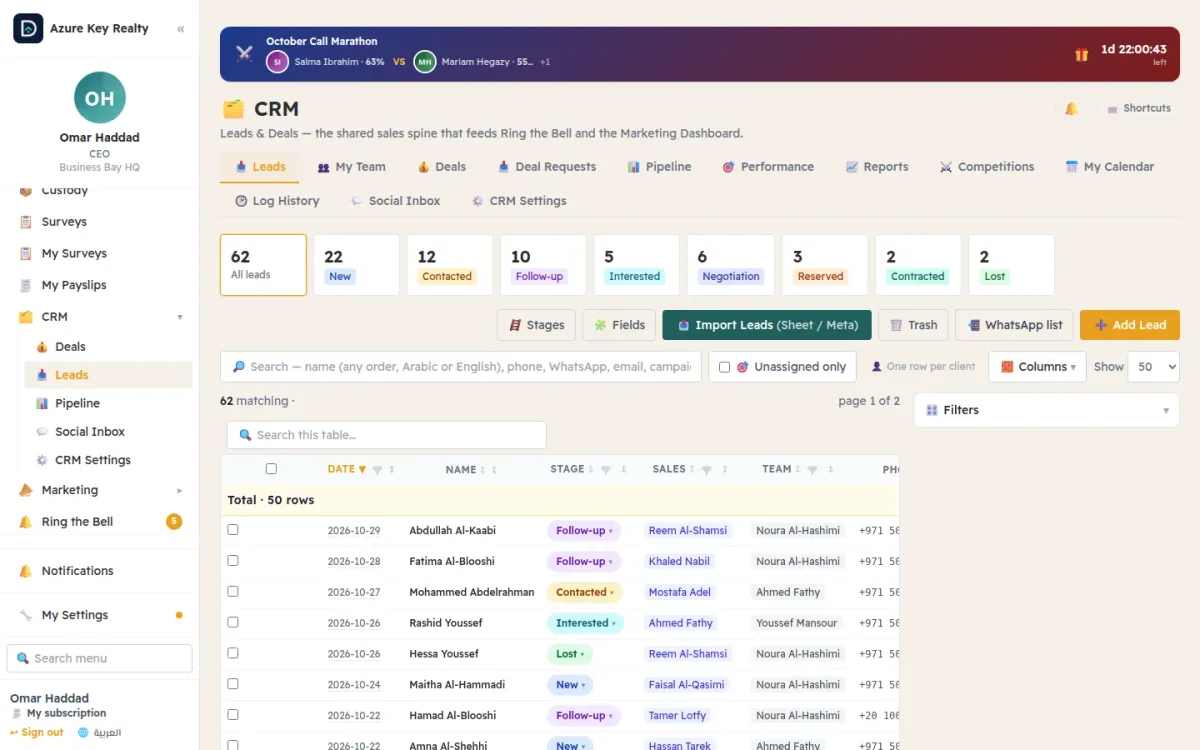
In a CRM that holds dates, stages, salespeople and sources on every lead, this audit is a filter and an export. In a spreadsheet it is a week of work, which is often the real reason old lists stay untouched.
Step 2: Write a short personal message with a reason to reply
An old leads follow up message fails when it sounds like a mailing list. It works when it sounds like a broker remembered the person. Four parts do the job: who you are, what they asked for, why you are writing today, and one easy question.
Pick one reason per segment
The reason is what separates a reply from a read receipt. Use only reasons that are true on the day you send:
- A new launch or a new phase in the area they asked about.
- A change in a developer's payment plan that fits the budget they mentioned.
- A unit that matches their earlier brief, such as the same bedroom count in the same compound.
- A ready-to-move or resale option, for people who said they needed to move soon.
Never invent urgency. If the plan changed, say what changed. If a unit became available, name the project and unit type.
Sample message structures
These are structures for a WhatsApp marketing template, with variables in double braces. Adapt the wording to your brand and to Arabic or English as the lead used.
- Matching the earlier brief: "Hello {{1}}, this is {{2}} from {{3}}. Some time ago you asked about a {{4}} in {{5}}. We now have a unit that fits that request. Would you like the details? Reply YES and I will send them."
- New launch: "Hello {{1}}, {{2}} from {{3}} here. A new phase has been released in {{4}}, the area you were interested in. Shall I send the brochure and the payment plan? Reply YES, or STOP if you would rather not hear from us."
- No recorded need: "Hello {{1}}, this is {{2}} from {{3}}. You enquired with us before, and I would like to know if you are still looking. Are you still considering a property? Reply YES or NO."
Keep each one to a few lines, with a single question that can be answered in one word. One question gets answers; three questions get silence. Our guide to WhatsApp for real estate covers more ways chats turn into deals once a lead replies.
Step 3: Send in small batches through approved WhatsApp templates
A business starts a conversation outside the 24-hour customer window only with an approved template used for its designated purpose. Old leads are almost always outside that window, so every message in a dormant clients WhatsApp campaign is a template.
Get the template approved first
Template messages generally need approval before they can be sent, and review can take up to 24 hours. Submit your templates a day or two before you plan to send, as marketing category, with the variables filled in on a sample. Once live, each template carries a status: Quality pending at first, then High, Medium or Low depending on negative feedback and read rates. Poor feedback can lead to the template being paused or disabled.
Respect the limits and send in parts
Your messaging limit is the maximum number of unique people you can message outside a customer service window in a moving 24-hour period. A new business portfolio starts at 250 unique users per day, and the limit rises to 2,000 after business verification or after 2,000 delivered template messages to unique numbers in 30 days using high-quality templates. These tiers vary and change over time, so confirm the current figures in your account.
Quality rating is assigned per business phone number and per template, and it decides automatic upgrades to higher tiers. Since October 2025 the limit applies to the whole business portfolio rather than to each phone number. A template at the lowest rating is paused for 3 hours the first time, 6 hours the second time, and disabled the third time.
New marketing templates, and any template without a green rating, may be paced: the first messages go out and the rest are held until Meta sees how people react. Bad feedback pauses the template and drops the held messages. The sensible way to scale is to send a small first batch, check the template status and the replies, then send the next part. WhatsApp also limits how many marketing templates one person receives in a period, so do not stack three campaigns on the same contact in one week.
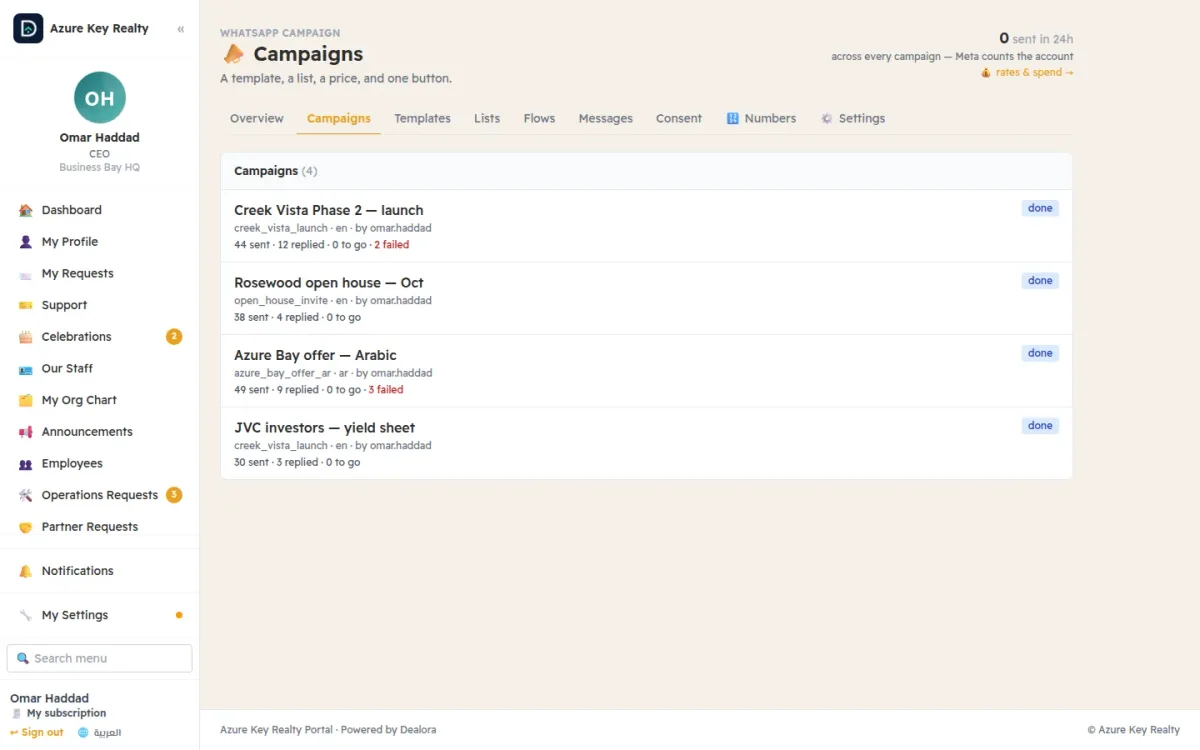
This is what the WhatsApp Campaign feature in Dealora is for: bulk campaigns with approved templates, and a list where each campaign shows its sent, replied and failed counts. Our sister site explains the same module from the broker's side under WhatsApp bulk messaging for brokerages.
Choose the send time and the order
Send on a weekday in the late morning, when a salesperson is at the desk to answer within minutes. A reply that waits until tomorrow is a reply wasted. Send your warmest segment first, usually the leads whose stated need matches a real unit, because their results tell you early whether the wording works.
Know what it costs
Since 1 July 2025 Meta charges per delivered template message, not per 24-hour conversation. The rate depends on the template category and the recipient's country code, and marketing templates have no volume discount. Marketing rates differ widely between countries and Meta revises them several times a year, so read the current rate card before you budget. From 1 October 2026, Meta charges for service messages (free-form replies inside the 24-hour window) beyond a free tier of 1,000 a month per business phone number, and utility templates sent inside an open window are charged too, while incoming messages stay free. Because you pay per delivery, cleaning the list in Step 1 saves money directly.
How to handle opt-outs and consent
People can block and report a business, and sustained low quality limits how many people the business can message. A clean opt-out path protects the number you sell from. Businesses must honour requests to stop, including removing the person from their contacts. The recommended practice is to act on opt-outs the same day and to keep opt-in records by message category.
In Egypt there is a legal layer on top. Law No. 151 of 2020 prohibits electronic communication for direct marketing unless the person's prior consent is obtained, the message states it is direct marketing, and the sender keeps electronic records of the consent. The Executive Regulations, Ministerial Decree No. 816 of 2025, issued on 1 November 2025, add that every marketing message must identify the sender and offer a free, simple way to opt out, and that direct electronic marketing needs its own licence or permit. The one-year compliance period ran to 1 November 2026, so these rules now apply.
Rules differ in Saudi Arabia, the UAE and elsewhere, and this is not legal advice, so have your adviser confirm what applies to your list.
In practice: put a stop option in every template, tag the contact as opted out in the CRM the moment they ask, and make sure no later campaign can select them.
Step 4: Log replies and move responders back into the pipeline
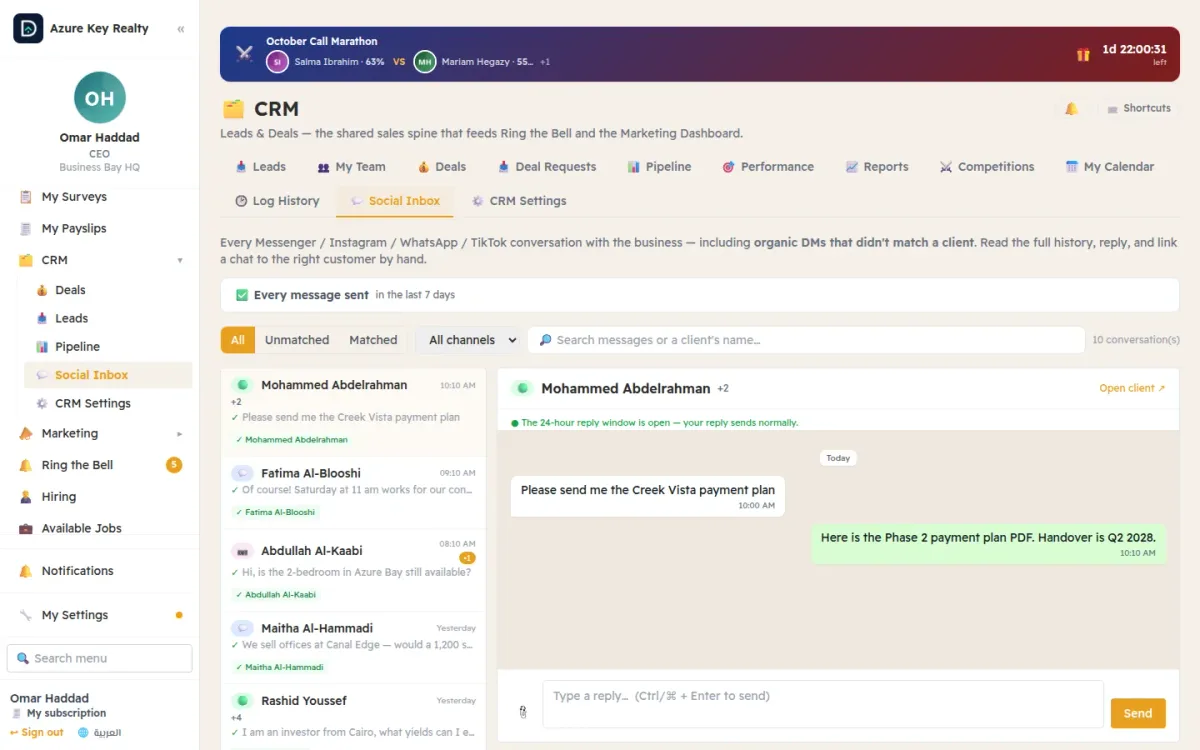
The message only starts the work. When a lead replies, a salesperson should answer in the same thread within minutes, and the reply should be recorded where the team can see it.
Keep every reply in the Social Inbox
A shared inbox such as the Social Inbox keeps WhatsApp, Instagram and Messenger conversations inside the CRM, so the reply is attached to the lead and not trapped on one salesperson's phone.
Sort each reply into an outcome
Every reply falls into one of four outcomes:
- Interested: set the lead's stage back to an active one, assign a salesperson and book a call or viewing.
- Not now: note the reason and a date to check again, and keep the lead in the nurture group.
- Wrong need: update the area, budget or unit type so the next message fits.
- Stop: mark as opted out and remove from every future send.
Silence is also an outcome. A lead who received two reasoned messages and said nothing moves to a slower cadence, not to a third message next week. If you want the stage definitions that make this routing clear, the CRM holds leads, clients, deals, the pipeline and sources in one place, and our seven steps from lead generation to closed deal show where a revived lead re-enters the funnel.
What to measure
Measure each batch separately, by segment, so you learn which reason works for which group. The numbers that matter are these:
- Delivered messages: what you actually paid for, and a quick check on how clean the list was.
- Reply rate: replies divided by delivered. Compare segments and templates against each other.
- Opt-out and block rate: if it climbs, stop and fix the wording or the list before the next batch.
- Template quality status: High, Medium or Low, checked between batches.
- Qualified conversations: replies that confirmed a live need.
- Viewings booked and deals reopened: the result that justifies the effort.
Divide total messaging cost by qualified conversations, not by messages sent. A cheap send that produces no conversation costs more than a smaller one that does. Review after two weeks, then repeat the plan on the next band of the list with the best-performing reason.
Make it a routine, not a one-off
Treat reactivation as a standing habit: a monthly check on who went quiet, a small send for each segment, and a rule that every reply is logged the same day. If your lead data sits in several spreadsheets or tools, the first job is to bring it into one system. That is where custom software development can help, building the import, the status rules and the connections around how your team works. You can also see the whole flow in Dealora, the real estate ERP Keys of Success built and runs. Start this week with Step 1: export the list, band it by last contact, and count how many leads you can legitimately message.
Sources
Frequently asked
How do you reactivate old property leads?
Segment the list by last contact date and the need the lead stated, remove anyone who should not be messaged, and send one short personal message with a clear reason to reply, such as a new launch or a unit matching their earlier brief. Send in small batches, log each reply in the CRM and move responders back into the pipeline.
Can I message old leads on WhatsApp without asking again?
Not automatically. A customer who messaged you first has not given opt-in for business-initiated messages later, and the opt-in must name your business. In Egypt, direct electronic marketing also needs prior explicit consent with electronic records. Check what consent you actually hold before you send.
How many old leads should I message at once?
Start with a small first batch, check delivery, replies and the template's quality status, then send the next batch. A new WhatsApp business portfolio starts at 250 unique users per day, and new marketing templates may be paced by Meta, so scaling in parts is safer than one large send.
What should an old leads follow up message say?
Name yourself and your company, remind the lead of what they asked for, give one concrete reason for writing now, and ask one easy question they can answer in a word. Add a clear way to stop receiving messages. Keep it short enough to read in one screen.
How do I know the reactivation worked?
Track delivered messages, replies, opt-outs, conversations that qualified, viewings booked and deals reopened. The reply rate tells you whether the message worked, and the opt-out and template quality figures tell you whether the list was healthy enough to keep messaging.
Related

Read next
- Real Estate Drip Campaign: Build a Follow-Up Sequence A step-by-step build of a real estate drip campaign for new property leads: the trigger, five messages over 14
- All in One vs Separate Real Estate Software: How to Decide Five apps for CRM, WhatsApp, ad reports, HR and files cost a brokerage hours of re-typing and lost lead histor
- Dealora Features: Every Module by Team, Plan and Dependency A map of Dealora's 38 modules by the team that uses them: what each does, which plan includes it, what it depe
- Real Estate Retargeting Tools: Which Channel Fits Each Lead Stage Cold lead, silent viewer, post-offer buyer or past client: each needs a different channel. A stage-by-stage co