
Dealora Features: Every Module by Team, Plan and Dependency
By Keys of Success Published Updated Reviewed by Ali Darwish 10 min read
A map of Dealora's 38 modules by the team that uses them: what each does, which plan includes it, what it depends on, which to switch on first and what the 90-day trial covers.

Dealora has 38 modules in one Arabic and English portal for real estate brokerages in Egypt, Saudi Arabia and the UAE. They cover core CRM and developers, sales, marketing, HR and AI. Starter includes Employees, CRM, Developers & Projects, Projects Map and the Developer Sales index; the other modules start on higher plans.
Dealora features come as 38 modules in one Arabic and English portal, built for real estate brokerages in Egypt, Saudi Arabia and the United Arab Emirates. They cover the CRM and the developer database, sales tools, marketing, HR, company administration and AI. Each module sits on a plan, and a few depend on something outside Dealora, such as the company's own Meta connection. Below, the modules are grouped by the team that uses them, so you can see what your brokerage needs on day one and what can wait.
What does Dealora include?
Dealora is the AI-powered real estate ERP that Keys of Success built and runs. It replaces the usual patchwork of a CRM for leads, a spreadsheet for developers, chat groups for each developer's salespeople and paper for HR. If you want the short product story first, the plain guide What Is Dealora? covers it, and the full list of module pages sits in the Dealora features index.
Four plans carry the modules, lowest first: Starter (up to 10 users), Growth (up to 50), Business (up to 150) and Enterprise (no user limit). Individual (up to 3 users) is a separate plan for a solo broker or a very small team. A plan's user cap is not a wall: past it you add users, which is an add-on from Starter, or you move up a plan. For how an ERP differs from a CRM at company level, real estate ERP software for sales, HR and marketing goes through the trade-offs.
Core Dealora features for the sales floor and the developer desk
These five modules are the base of Dealora. They are the ones every brokerage touches daily, and all five are included on every plan, Starter included.
- CRM: leads, clients, deals, the pipeline, sources and reports. Salespeople work their leads here, team leaders watch stages and managers read the reports.
- Employees: employees, departments and job titles, permissions, profile cards and Our Staff. The owner or operations manager sets who sees what before anyone else logs in.
- Developers & Projects: developers, their projects, phases and files. Sales and the developer relations lead keep one record per developer instead of a spreadsheet.
- Projects Map: projects on a map, the project board, and sending project files to a client. Salespeople use it while advising a buyer on location.
- Developer Sales index: the salespeople at each developer and their numbers. Anyone who needs to reach a developer's sales contact fast uses it.
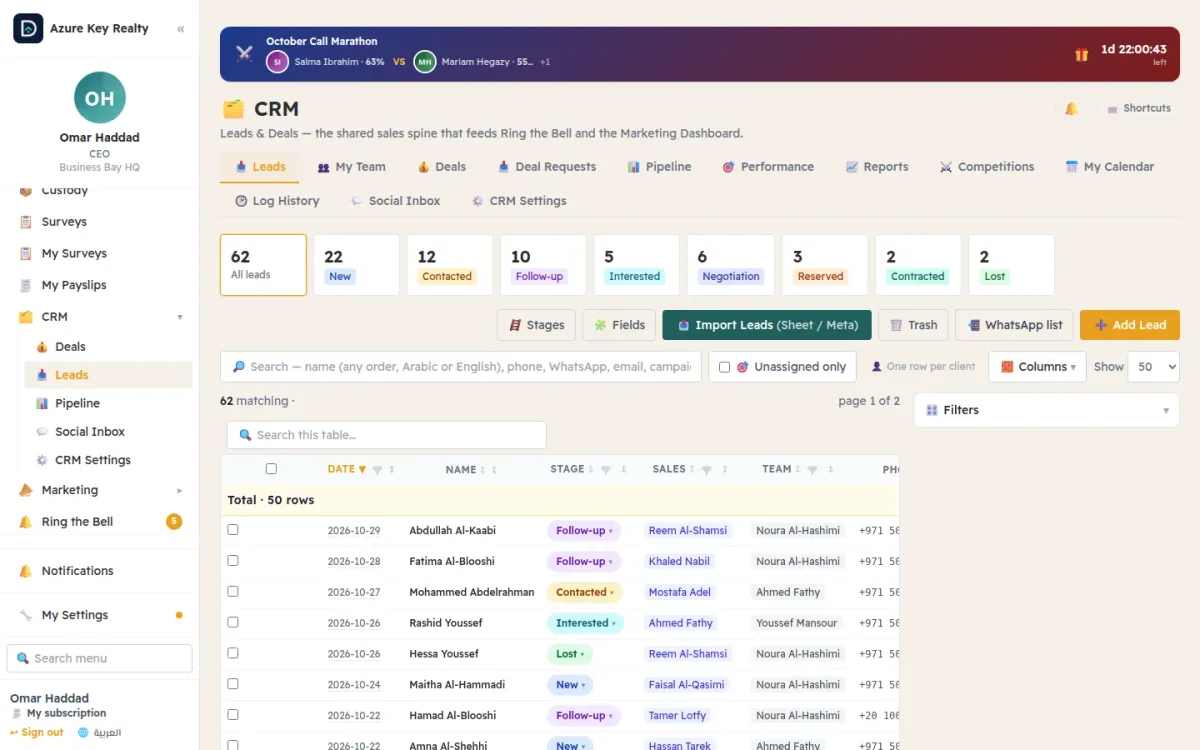
The CRM is the centre of gravity. A lead list with stage counts and each lead's date, stage, salesperson and team means a team leader can see where the pipeline is thin without asking anyone.
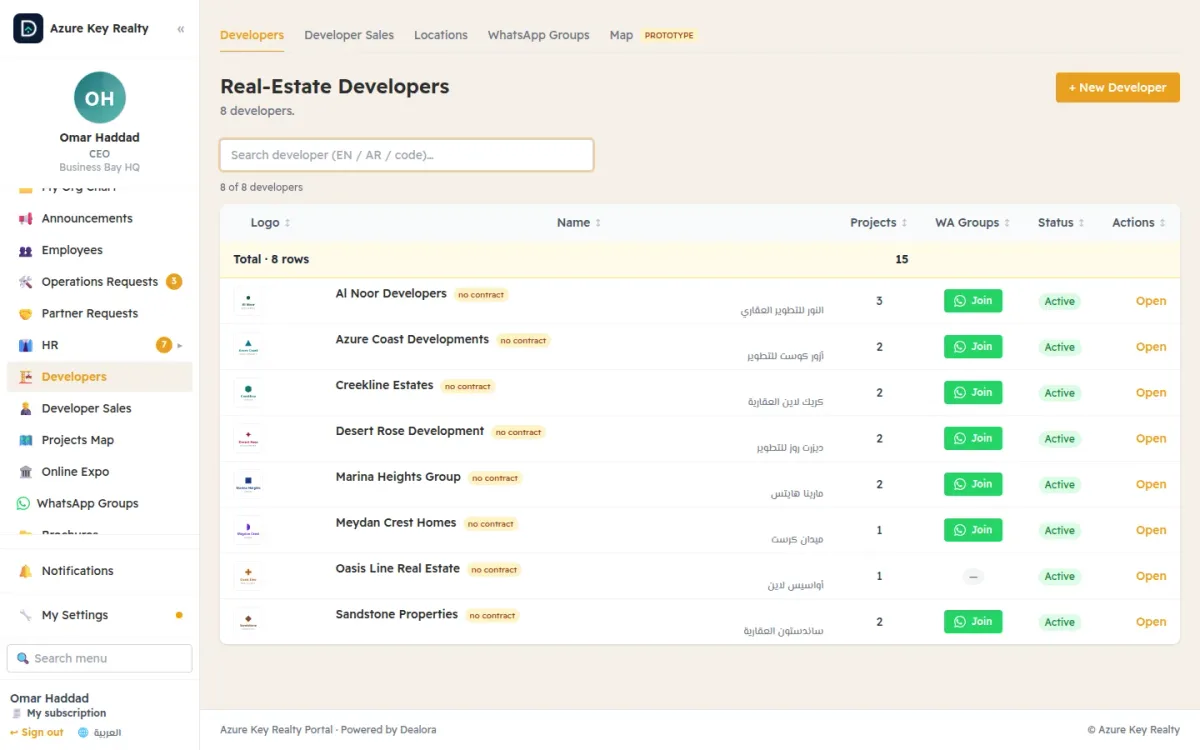
Developers and projects matter more to a brokerage than to most businesses, because a broker sells on behalf of many developers at once. The developers list, with logos, project counts and links, is where that starts.
Sales modules: messages, campaigns and team energy
Most real estate conversations happen in chat, so these modules bring chat into the CRM and keep the team moving. Nothing in this group is on Starter. The lowest plan for each is shown in brackets.
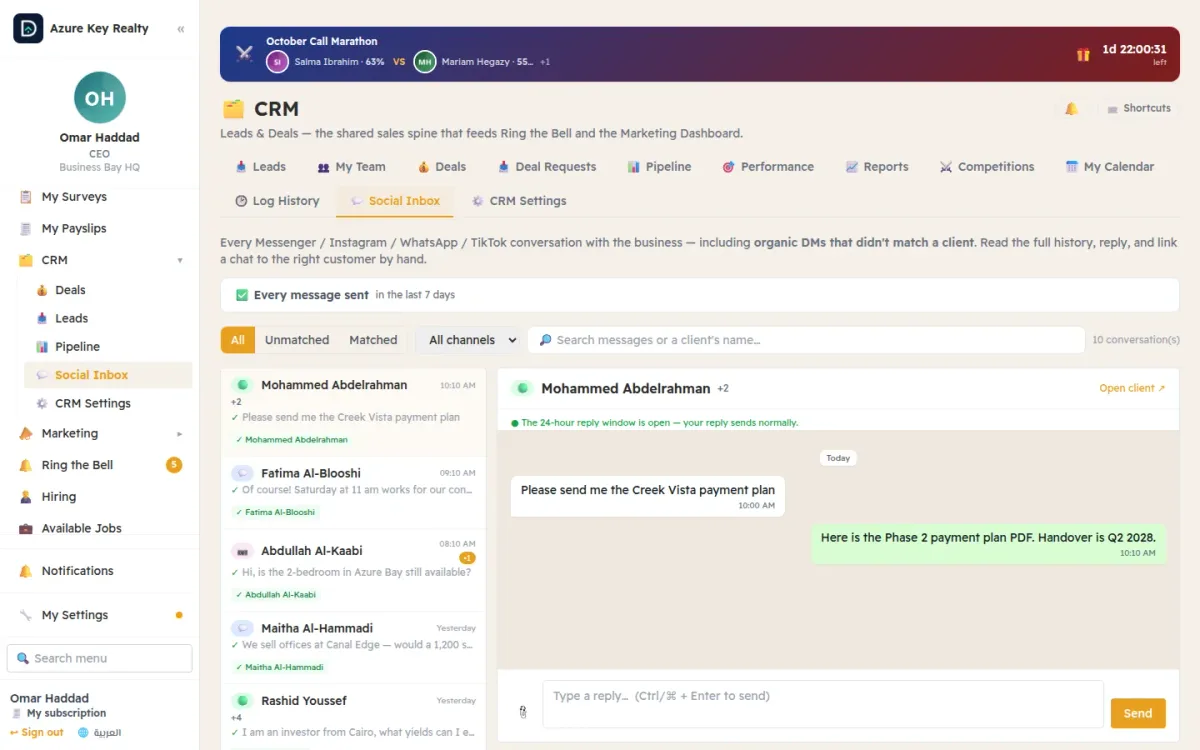
- Social Inbox (Growth): Facebook, Instagram and WhatsApp messages inside the CRM. Salespeople and the social media team answer from one screen. It works only together with the company's own Meta connection: its Facebook page, Instagram and WhatsApp Business number.
- WhatsApp Campaign (Growth): bulk WhatsApp campaigns with approved templates, used by marketing and sales managers. It needs the same Meta connection: the Facebook page, Instagram and WhatsApp Business number.
- Developer WhatsApp Groups (Growth): find a developer and open its WhatsApp group link. Salespeople use it to reach the right group in seconds.
- Brochures (Growth): the library of PDF brochures for the sales team, so nobody hunts through chats for the latest file.
- Competitions (Growth): sales competitions between salespeople or teams, with a target, a deadline and a winner. Sales managers run them.
- Ring the Bell (Growth): deal celebrations, the Google review request and the team boards.
- Ring the Bell, Production (Enterprise): the celebration production stages of video, design and posting, for companies with a creative team.
- Online Expo (Enterprise, or an add-on from Growth, charged monthly or per event): expo editions, participating developers, offers, video meetings and reports.
With a shared inbox, a conversation that starts on Instagram and moves to WhatsApp stays attached to one client record.
One point on WhatsApp costs, because it affects campaign planning: Meta gives every WhatsApp business phone number 1,000 free service messages a month, counted per number, reset monthly and not rolled over, and it charges from the 1,001st. A free-form (non-template) reply is allowed only within 24 hours of the client's last message; after that only an approved template gets through. Meta sets these terms and they can change, so check its current pricing before you budget.
Marketing modules: from ad spend to closed deal
- Marketing Dashboard (Growth): spend to leads to sales, with cost per lead and return on ad spend. Marketing managers and owners use it to see which source produces deals, not only enquiries.
- Meta Ads (Enterprise, or a monthly add-on from Growth): live Meta campaigns, strategies built with AI, and launch approvals. Every launch waits for a person to approve it. It works only together with the company's own Meta connection: its Facebook page, Instagram and WhatsApp Business number.
- Task Management (Growth): task boards with workspaces, a calendar, files and comments, for the marketing and design team.
- Passwords Vault (Business): encrypted logins for social media, email and apps; a password shows only with a one-time code. Useful when several people share the company's page logins.
Setting up the Meta connection itself is an add-on from Starter (Meta connection setup), so you can have it done for you rather than wiring it by hand.
HR and operations modules
A brokerage with fifty salespeople carries a real HR workload. These modules move it out of paper and chat groups. Business is the lowest plan for most of them, so a small team can run for months without needing any.
- ATS, Hiring (Business): job openings, candidates and offers, used by HR and team leaders who hire constantly.
- Careers public page (Business): a public careers page and shareable job links where anyone can apply.
- Attendance & Leave (Business): mobile check-in and out, shifts, leave types, holidays, deductions and monthly reports.
- Payroll (Enterprise): salaries, allowances, advances, bonuses and deductions, and the monthly payslip run. Finance and HR use it.
- Employee Lifecycle (Business): the steps of an employee joining and leaving, each handed to a responsible person.
- HR Requests (Business): employees request HR letters and certificates; HR handles them.
- Operations Requests (Business): requests such as business cards, reviewed, forwarded and fulfilled by operations.
- Company Policy and Document Compliance (Business): policies every employee must read and acknowledge, and follow-up with employees who have not completed their paperwork.
- Bank Account Opening (Enterprise): the procedure for new hires: the bank, the steps and whom to contact.
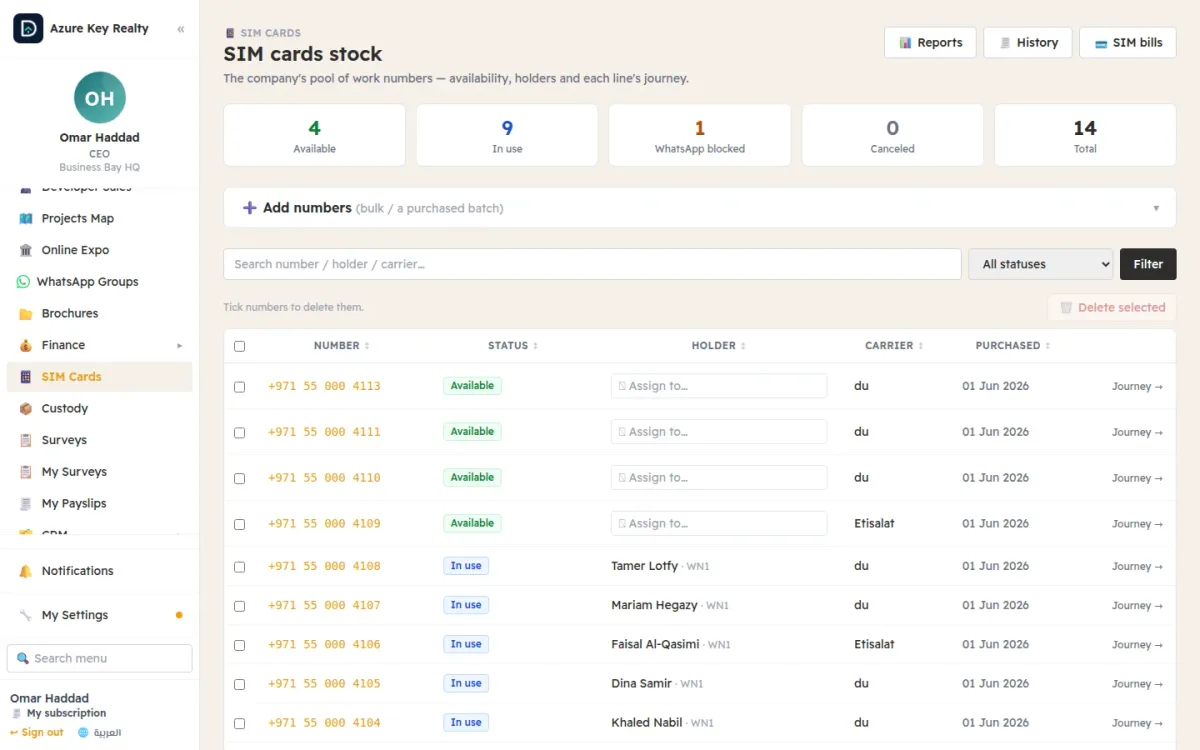
- Custody and SIM Cards + Bill Pay (Business): the company asset register with receipt confirmation, and company phone lines with their monthly bills and what each employee owes.
The company-wide modules are lighter. Org Chart, Announcements and Celebrations start on Growth. Top Achievers, Surveys, Company Profile and Partner Requests (a public form for developers, suppliers and the press) start on Business.
AI modules and what they depend on
Dealora's AI is built by Keys of Success to save the sales team time, and each piece has a clear condition.
- AI Sales Agent: AI phone calls to clients, with the recording and a verdict on each call. It is an add-on from the Starter plan, and calls cost by usage.
- Chat Agent (Growth): answers customers on Instagram, Messenger, WhatsApp and TikTok from the company's own Knowledge, and sends only real customers to the CRM. It works only with the AI Sales Agent add-on and the company's own Meta connection, and it is charged by use as well.
- Meta Ads: covered above, with AI-built strategies and a human approval before every launch.
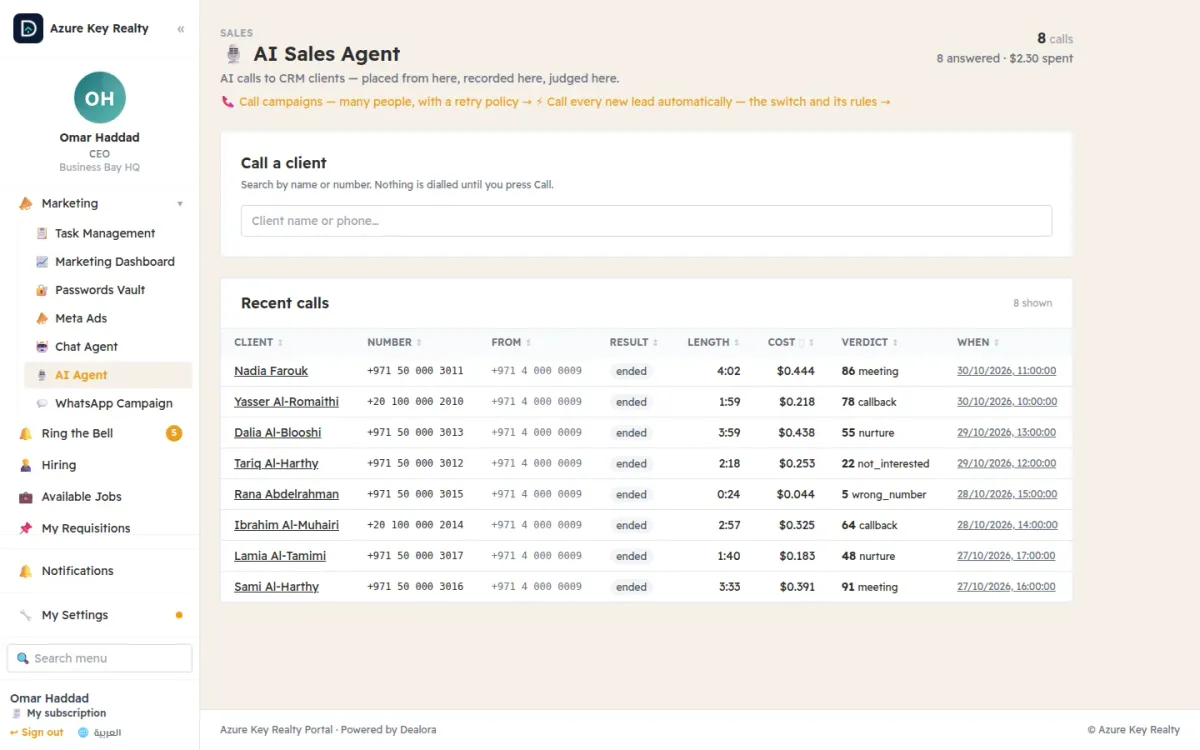
Reading those verdicts well is its own skill; AI sales call analysis shows how to act on one.
Which Dealora features depend on a Meta connection or an add-on?
| Module | Lowest plan | Needs |
|---|---|---|
| Social Inbox | Growth | The company's own Meta connection (Facebook page, Instagram and WhatsApp Business number) |
| WhatsApp Campaign | Growth | The same Meta connection |
| Meta Ads | Enterprise (add-on from Growth) | The same Meta connection |
| Chat Agent | Growth | The AI Sales Agent add-on and the Meta connection |
| AI Sales Agent | Add-on from Starter | Usage-based call charges |
| Online Expo | Enterprise (add-on from Growth) | Monthly or per-event charge as an add-on |
Which Dealora modules should a brokerage switch on first?
Resist the urge to turn everything on. A sensible order, built around what each module needs before it is useful, is this:
- Employees, so permissions exist before data does.
- Developers & Projects, loaded with the developers you sell most.
- CRM, with your existing leads imported and each one given an owner and a stage.
- Projects Map and the Developer Sales index, which cost little to adopt and speed up client conversations.
- From Growth: the Social Inbox and Marketing Dashboard, once the Meta connection is in place and leads arrive from ads.
- From Business: attendance, requests and policies, when HR admin starts taking real time.
- Payroll on Enterprise last, when salary runs justify moving off spreadsheets.
To start on your own, create a free Dealora account and start the 3-month trial.
Five tests to run in the 90-day free trial
Every new company gets 3 months free on the Starter plan. The trial holds exactly five modules: Employees, CRM, Developers & Projects, Projects Map and the Developer Sales index, with no data export. Starter allows up to 10 users, enough for a pilot team. Anything else, such as the Social Inbox on Growth or Payroll on Enterprise, is outside the trial and is judged from its page and a conversation with the team.
- Permissions. Create a salesperson, a team leader and a manager in Employees, and check that each sees only what they should.
- Import and ownership. Load a real sample of leads into the CRM and confirm every lead has a stage, a source and a salesperson.
- The developer record. Enter three developers with their projects, phases and files, then ask a salesperson to find one unit file without help.
- The client conversation. Use the Projects Map to pick projects for a pretend buyer and send the project files to them.
- The manager view. After two weeks of use, read the CRM reports and ask whether they answer the question you ask in your Monday meeting.
What Dealora does not replace
Dealora runs the company, but it does not hold your licences. In Saudi Arabia, brokerage activity needs a FAL licence from the Real Estate General Authority. In Dubai, any real estate advertisement needs a permit from the Trakheesi system on the Dubai Land Department website, and the permit number must appear in the advertisement. In Egypt, an official register for real estate brokers became mandatory under amendments issued in January 2026, and the grace period for brokers to adjust their status ended in July 2026. Those steps stay with your compliance officer; Dealora keeps the client, deal and team records around them.
Next step
List the five people who will use the portal first, then start the trial and run the five tests above with real data. If you want a second opinion on which plan fits a team of your size, talk to Keys of Success and bring your current tools list.
Sources
Frequently asked
What does Dealora include?
Dealora includes 38 modules grouped by team: core (employees, CRM, developers and projects, projects map, developer sales index), sales, marketing, HR, company administration and AI. Which modules a company gets depends on its plan: Starter, Growth, Business, Enterprise or Individual.
Which Dealora features are in the free trial?
The 90-day free trial runs on the Starter plan and holds Employees, CRM, Developers & Projects, Projects Map and the Developer Sales index, without data export. Every other module is named with the lowest plan that includes it, for example Social Inbox on Growth and Payroll on Enterprise.
What does the Dealora Chat Agent need to work?
The Chat Agent is included from the Growth plan, but it works only together with the AI Sales Agent add-on and the company's own Meta connection: its Facebook page, Instagram and WhatsApp Business number. Without both, it does not answer customers.
Which Dealora modules should a brokerage switch on first?
Start with Employees for permissions, then Developers & Projects, CRM, Projects Map and the Developer Sales index. These five run on the Starter plan. Add the Social Inbox and Marketing Dashboard on Growth once leads are flowing, and HR modules from Business when the team grows.
Is Dealora only for large brokerages?
No. Dealora suits a small office as well as a large company. A small team can run clients, developers and projects on Starter, which allows up to 10 users. Past that cap you add users or move up a plan, and larger companies can bring HR and management reporting into the same portal.
Related

Read next
- Real Estate Drip Campaign: Build a Follow-Up Sequence A step-by-step build of a real estate drip campaign for new property leads: the trigger, five messages over 14
- All in One vs Separate Real Estate Software: How to Decide Five apps for CRM, WhatsApp, ad reports, HR and files cost a brokerage hours of re-typing and lost lead histor
- How to Set Up a Brokerage on Dealora: A Week-by-Week Checklist A two-week order for your first Dealora account: people and permissions, pipeline and sources, clients and lea
- Software for Dubai Property Agencies: 7 Tests Before You Buy A Dubai-specific checklist for choosing agency software: seven tests on your own client list, developer data,