
How to Set Up a Brokerage on Dealora: A Week-by-Week Checklist
By Keys of Success Published Reviewed by Ali Darwish 8 min read
A two-week order for your first Dealora account: people and permissions, pipeline and sources, clients and leads, then developers and projects. Each step names the owner and what done looks like.

To set up a brokerage on Dealora, work in this order: employees, departments and permissions; pipeline stages and lead sources; clients and leads in the CRM; then developers and projects. The core takes about two weeks on the free 3-month Starter account. Review six checks at the end of week two before adding anything else.
To set up a brokerage on Dealora, work in this order: people and permissions first, then the pipeline and lead sources, then your clients and leads, then developers and projects. That core takes about two weeks on the free 3-month Starter account, and the rest of the trial is for using it every day. Dealora is sold in Egypt, Saudi Arabia and the UAE, in Arabic and English, and the same order holds in all three markets.
Each step below says what to do, who owns it and what done looks like. If you still need the full picture of the product before you start, the plain guide to what Dealora is covers it, and the Dealora product page shows the modules in one place.
Before you set up a brokerage on Dealora: what to gather
The setup goes quickly when the inputs are ready and slowly when they are in five people's phones. Spend a day collecting them before anyone logs in. Keys of Success builds and runs Dealora, and the first decision to make is who is in charge of the setup.
- A staff list: full name, job title, department, branch and the phone or email each person will log in with.
- Your client and lead sheets: every spreadsheet, exported contact list and notebook that holds a buyer or an enquiry.
- Your developer list: the developers you sell for today, with the projects you actively pitch and their files.
- Your current stage and source names: whatever your team already says out loud, such as «viewing booked» or «Facebook».
Owner: the owner or operations manager, as the single setup owner. Done looks like: one named person, one folder with these four items, and the company's account open. To open it, start the free 3-month trial on Starter.
One point on client data. Client lists hold personal data, so remove people you have no reason to contact before you load anything, and check your handling against the data protection rules of the country you operate in.
Week 1, days 1 and 2: add employees, departments and permissions
People come first because every lead, deal and project file will belong to someone. In the Employees module, create the departments, the job titles and then each person, with their profile card and permissions.
Decide permissions on paper before you click anything. A short table of «job title, what they need to see, what they must not change» takes twenty minutes and saves a week of corrections. Starter allows up to 10 users; past that you add users (an add-on from Starter) or move up a plan, so enter only the people who will actually work in the system now.
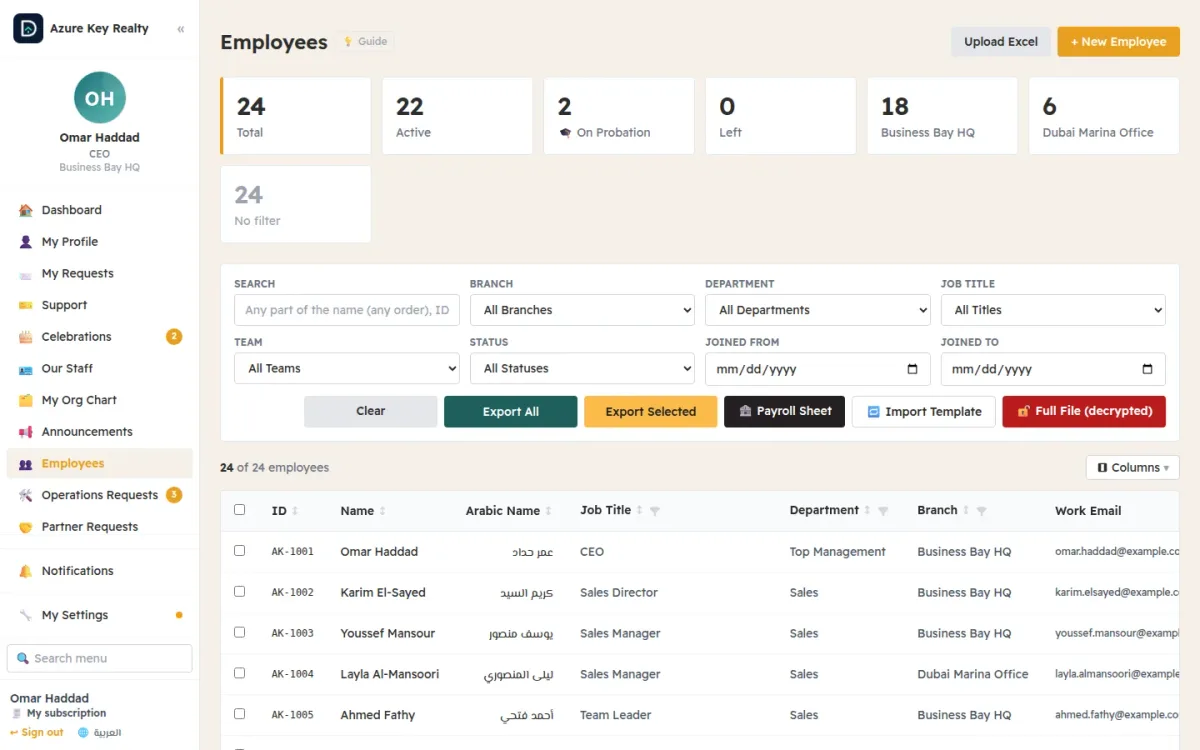
Owner: the setup owner, with an HR or admin assistant entering records. Done looks like: every active salesperson and manager has a profile with title and department, each has logged in once, and a test login as the lowest-access salesperson shows only what that job needs.
Week 1, days 3 to 5: set the pipeline stages and lead sources
Do this before you load a single client, because every record you bring in needs a stage and a source to land in. Open the CRM module, which holds leads, clients, deals, the pipeline, sources and reports, and set both lists.
For stages, use five to seven names that describe what happened to the buyer, not what the salesperson felt: new, contacted, viewing booked, negotiating, won, lost. Write one sentence for each stage that says when a lead enters and when it leaves. For sources, list the real channels only, such as a Meta ad, a property portal, a referral, a walk-in and a developer event, and give each one a single spelling. Two names for the same channel will split your reports in half. A fuller walk through the CRM itself is in the guide to real estate CRM setup for brokers in Egypt and the Gulf.
Owner: the sales manager. Done looks like: a salesperson can say in one sentence what stage a lead is in and why, and a test lead moves through every stage without anyone asking what a name means.
Week 2, first half: bring clients and leads into the CRM
Clean the sheets first. One row per person, one phone number format, merged duplicates, and for each record a stage, a source and a salesperson. Rows without an owner are the ones that go cold, so assign them now, not later.
Load a first batch of about 50 records, open them in the CRM and compare them with your sheet. Fix the pattern that went wrong, then load the rest. If you have thousands of rows and want to confirm the best way to bring them in, ask the Dealora team before you start and tell them roughly how many rows you hold.
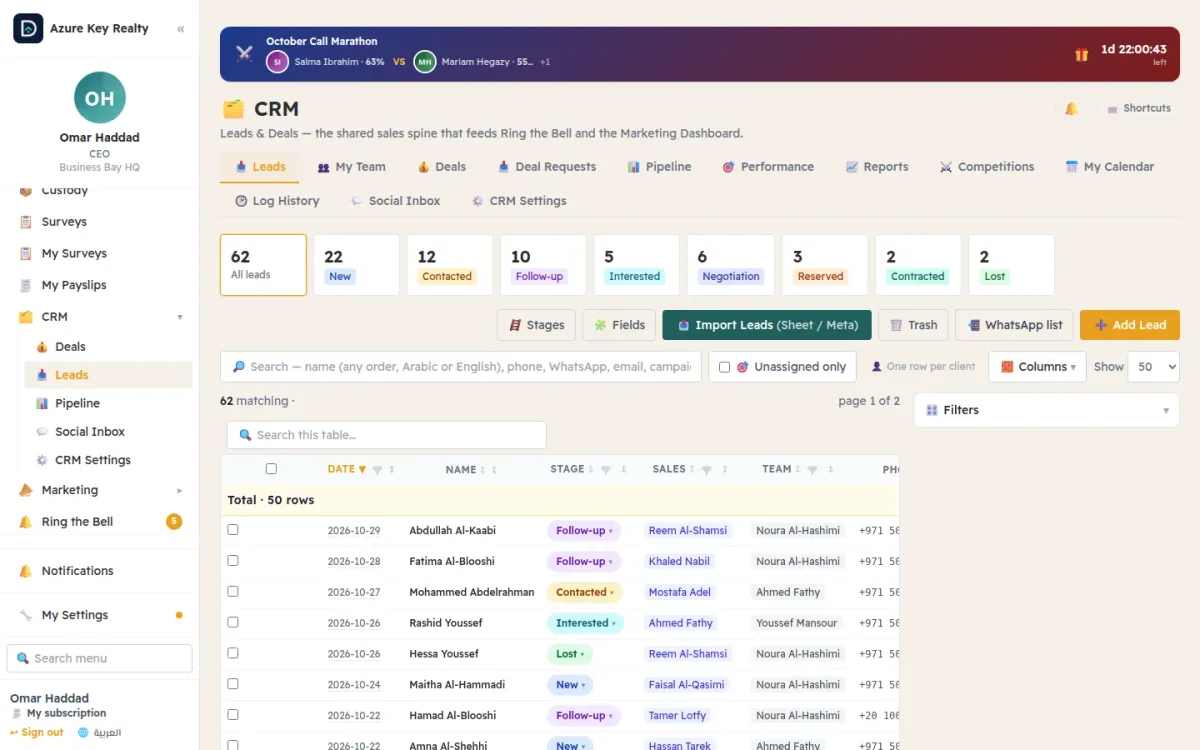
Keep the original files as they are. The Starter plan has no data export (export starts on Growth), so your sheets are your only copy of the starting point. Owner: the sales manager, with each salesperson checking their own leads. Done looks like: the number of records in the CRM matches your cleaned sheet, and no lead is missing a salesperson, a stage or a source.
Week 2, second half: load developers and projects
Brokerages sell other companies' inventory, so the developer side matters as much as the client side. In Developers & Projects, add the developers you sell for today, then their projects, phases and files. Start with what your team pitched in the last month. A complete list of ten active projects is worth more than a half-filled list of eighty.
Then place the projects on the Projects Map, which also lets a salesperson send project files to a client. Add the salespeople you deal with at each developer in the Developer Sales index, so the contact is in the system and not in one person's phone.
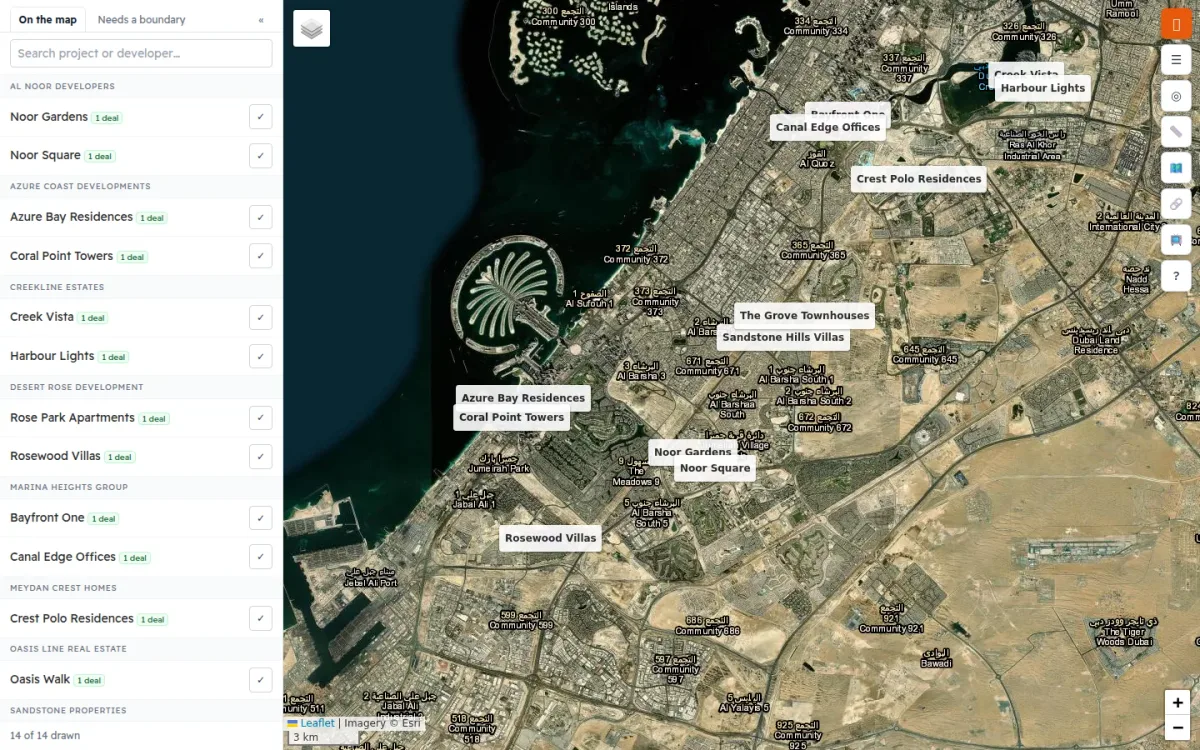
Owner: the sales director or whoever manages developer relationships. Done looks like: a salesperson can find a project, open its files and send them to a client without asking a colleague.
The end-of-week-two review: six checks
Sit down with the setup owner, the sales manager and one salesperson, and go through these before adding any module.
- Logins: every salesperson has signed in and can name their own leads without searching.
- Complete records: no lead lacks an owner, a stage or a source.
- Stage spread: if one stage holds most of the leads, its definition is probably too vague, so tighten the sentence that says when a lead leaves it.
- Developer coverage: every project the team pitched in the last month is loaded with its files.
- Permissions: log in as the lowest-access role and confirm nothing is visible or editable that should not be.
- Reports: compare the CRM's count of new leads for the week with your own count. A gap means leads are still living outside the system.
Fix what fails before you move on. Setup that is only mostly right turns into reports nobody trusts.
Weeks 3 and 4: use it daily, then decide what comes next
The point of the next two weeks is habit. Run the weekly sales meeting from the CRM, not from memory, and ask that every new enquiry enters the system the day it arrives. Note the questions your team asks, because they show which module you will want next.
Several useful modules are not in the trial. They sit on higher plans, and it makes sense to add them after the core, because they work with the people, sources, clients and projects you have just entered. The plan column is the lowest plan that includes the module.
| Module | Lowest plan | Why it comes later |
|---|---|---|
| Social Inbox | Growth | Messages land in the CRM, so stages and sources must be settled first. Needs your own Meta connection: Facebook page, Instagram and WhatsApp Business number. |
| WhatsApp Campaign | Growth | Campaigns go to the lists you built. Needs the same Meta connection and approved templates. |
| Marketing Dashboard | Growth | Spend to leads to sales only means something when sources are named consistently. |
| Task Management | Growth | Worth adding once the team already uses the CRM daily. |
| Brochures | Growth | A library for the sales team, best added after projects are loaded. |
| Developer WhatsApp Groups | Growth | Builds on a finished developer list. |
| Attendance & Leave, HR Requests | Business | HR processes belong after sales is running. |
| Payroll | Enterprise | Needs a stable employee list first. |
| AI Sales Agent | Add-on from Starter | AI phone calls to clients, charged as a monthly subscription plus the calls. It needs leads with clean phone numbers. |
| Chat Agent | Growth | Needs the AI Sales Agent add-on and your own Meta connection, and is charged by use as well. |
Because none of these are in the free trial, judge them from their pages and from a talk with the Dealora team about the right plan. The article on Dealora features by team, plan and dependency lists every module with its plan. If you are a solo broker or a team of up to 3, the Individual plan is a separate option with the core modules and no data export.
Before the trial ends
The Starter trial lasts 3 months. Use month two to decide whether the core is working: are leads entered the day they arrive, do salespeople open the CRM without being told, does the weekly count match reality. Month three is for deciding which plan fits, so ask the Dealora team before the last week, not after it.
Plan contents, user limits and add-ons are on Dealora's pricing page, and the Dealora team gives the amounts for paid plans. If a question comes up while you are setting up, send it through the contact page with your country and the number of users you expect.
Frequently asked
How long does it take to set up a brokerage on Dealora?
The core takes about two weeks: employees and permissions in the first days, the pipeline and sources by the end of week one, then clients, leads, developers and projects in week two. A very small office can move faster. The slowest part is usually cleaning your own client sheets, not the software.
What should I add to Dealora first?
Add your employees, departments and permissions first. Every lead, deal and project file belongs to a person, so the people must exist before the data. After that, set the pipeline stages and lead sources, then bring in clients and leads, and only then load developers and projects.
Can I try WhatsApp Campaign or Social Inbox during the free trial?
No. The free trial is 3 months on the Starter plan, which holds Employees, CRM, Developers & Projects, Projects Map and the Developer Sales index. Social Inbox and WhatsApp Campaign are on Growth and above, and both need your own Meta connection. Judge them from their pages and a talk with the Dealora team.
Can I export my data from the Starter plan?
No. Starter has no data export; export is included from the Growth plan. Keep your original client and developer files untouched while you load Dealora, so you always have a copy of what you started with and can compare counts.
How many people can use a Starter account?
Starter allows up to 10 users. Past that you add users, which is an add-on available from Starter, or move up a plan. A solo broker or a team of up to 3 can also look at the separate Individual plan.
Who should own the setup inside the brokerage?
One named person, usually the owner or the operations manager, with the sales manager owning the pipeline and sources. Shared ownership leaves gaps. The setup owner makes the calls on names, stages and permissions and checks the work at the end of week two.
Related

Read next
- Software for Dubai Property Agencies: 7 Tests Before You Buy A Dubai-specific checklist for choosing agency software: seven tests on your own client list, developer data,
- Software for Riyadh Property Agencies: 9 Tests Before You Buy A buying checklist for a Riyadh brokerage office: nine tests for Arabic and English screens, client records, W
- Dealora Features: Every Module by Team, Plan and Dependency A map of Dealora's 38 modules by the team that uses them: what each does, which plan includes it, what it depe
- Real Estate Drip Campaign: Build a Follow-Up Sequence A step-by-step build of a real estate drip campaign for new property leads: the trigger, five messages over 14